Shapes#
A material decides a fragment's color, coverage, surface normal, and lighting response. Every shape is an entity: Transform2D places its quad, Tint colors it, Material selects its silhouette, and Renderable2D makes it drawable. No image is needed; the renderer supplies an opaque white texel.
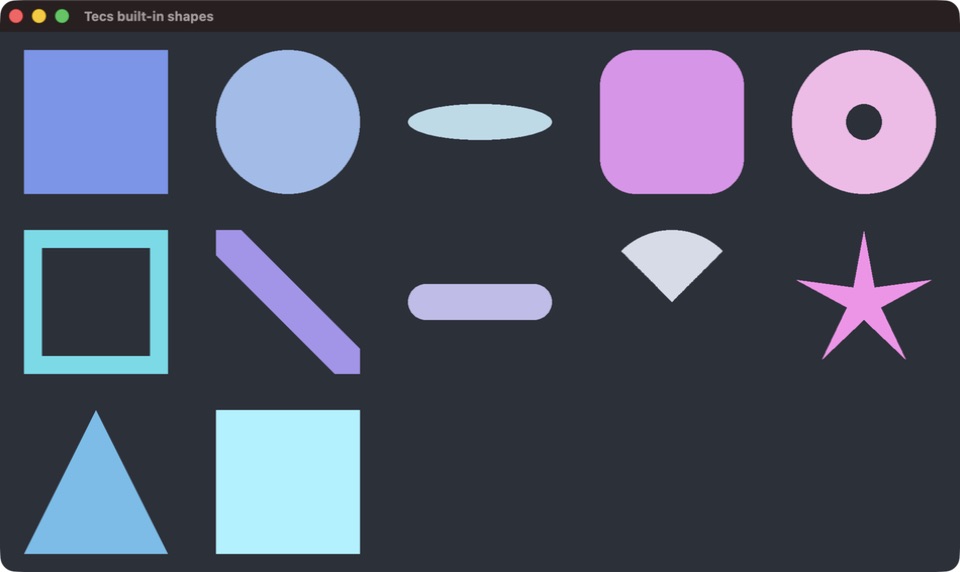
The gallery follows the material table below, reading left to right, then down.
world:spawn(
    tecs.ecs.Transform2D(120, 80, 0, 1, 0, 96, 64),
    tecs.gfx.Tint(0.2, 0.6, 1, 1),
    tecs.gfx.Renderable2D
)
world:spawn(
    tecs.ecs.Transform2D(260, 80, 0, 1, 0, 64, 64),
    tecs.gfx.Material(tecs.gpu.materials.id("circle")),
    tecs.gfx.Tint(1, 0.4, 0.2, 1),
    tecs.gfx.Renderable2D
)
The first entity is a rectangle. Equal width and height make a square. The second is a circle; unequal scale axes stretch its quad. Coordinates name the quad's center and rotation is in radians. The final two transform arguments are its width and height.
Built-in materials#
Resolve IDs by name when constructing a material. An entity without Material uses textured at ID zero. Remaining IDs follow sorted material names, so persisted state should store a name and resolve it again.
| Material | Shape | Material.param |
|---|---|---|
textured |
Rectangle or square without a sprite; image with a sprite | Ignored |
circle |
Circle with a dome normal for lighting | Ignored |
ellipse |
Ellipse | Height fraction |
rounded |
Rounded rectangle | Corner-radius fraction |
ring |
Ring | Inner-radius fraction |
frame |
Rectangular outline | Thickness fraction |
line |
Line through the quad | Thickness fraction |
capsule |
Capsule | Height fraction |
pie |
Circular sector | Full-turn sweep fraction |
star |
Star | Valley depth |
triangle |
Triangle | Ignored |
emissive |
Rectangle that emits light | Emission strength |
Material.param supplies a scalar from zero to one. These silhouettes are computed by shaders rather than stored in an atlas. glyph and glyphalpha are two additional materials for authored glyph rendering. See text for the font and text-entity workflow.
world:spawn(
    tecs.ecs.Transform2D(180, 180, 0, 1, 0, 120, 80),
    tecs.gfx.Material(tecs.gpu.materials.id("rounded"), 0.15),
    tecs.gfx.Tint(0.3, 0.8, 0.5, 1),
    tecs.gfx.Renderable2D
)
Lighting and ordering#
Shape materials participate in deferred lighting. Set ambient light with tecs.gfx.lighting.setAmbient or add point-light entities. Circles carry a dome normal; a moving light therefore reveals their curved appearance.
A tint alpha below one selects the blended lane. Layers control sort order, screen coordinates, parallax, and unlit overlays. Materials explains coverage, surface properties, emission and custom WGSL bodies.
Run the gallery#
nupp task ex-shapesThis displays the built-in shape materials. Use BENCH_SHAPE=circle to select one kind, or BENCH_COUNT=100000 to fill the view with a larger grid.
Rendering benchmarks measures actual native frames up to the 4,194,303-entity limit.