# tecs.ui
Build retained interfaces from ordinary Tecs entities.
`tecs.ui` supplies responsive layout, intrinsic sizing, clipping, scrolling,
hit testing, keyboard focus, and semantic interaction events for HUDs, menus,
inspectors, inventories, and in-world panels. A UI tree is an ECS hierarchy:
spawn entities, relate them with `ChildOf`, describe their boxes with
[`Style`](/modules/ui/#tecs.ui.Style), and let the plugin update only the layout and
GPU instance data that changed. Screen roots follow window resizing and pixel
density automatically.
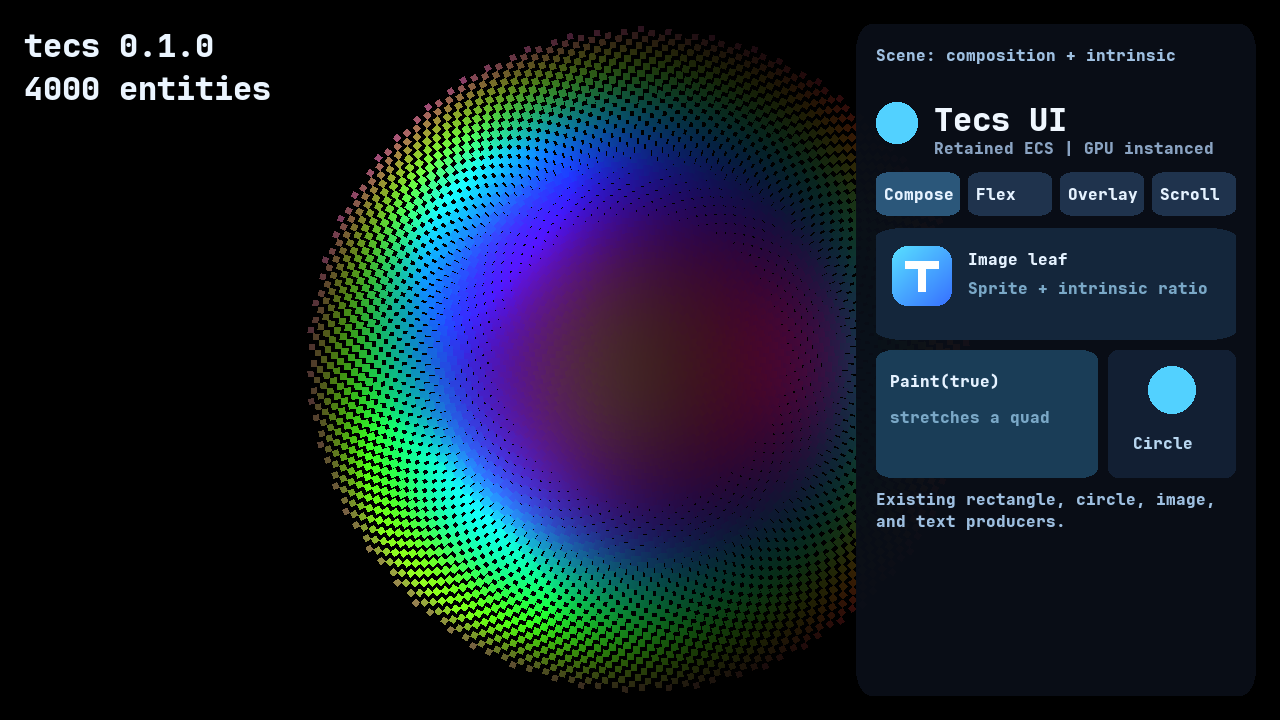 Use the module when several visual entities must size and position one another,
when content must scroll or clip, or when pointer and keyboard input should
target the same retained boxes that were drawn. It is not a DOM or a separate
widget renderer. Existing rectangles, circles, sprites, images, and text remain
the visible pieces, with their current materials, shaders, batching, and dirty
tracking. `tecs.ui` composes those pieces and gives them layout and interaction.
[`Style`](/modules/ui/#tecs.ui.Style) describes layout rather than appearance. Put a
drawing component on the same entity or on a child, and add `Paint(true)` when
its transform should stretch to the computed box. Drawing remains in the
existing instanced producers and shaders.
The [complete interface guide](/ui/) contains 37 copyable recipes for layout,
visual composition, intrinsic sizing, images, scrolling, interaction, focus,
and dirty-aware updates. The examples below provide a complete starting point
without leaving this API reference.
The plugin retains one native layout tree keyed by ECS entity ID. `ChildOf` is the
layout hierarchy as well as the transform hierarchy. The layout system writes
`Layout` only when the box changes and writes `RelativeTransform2D` only when
layout or scrolling changes its result. Query membership observers retain
structural invalidation, the ECS dirty-archetype set gates value updates, and
the native tree computes only dirty roots before returning a compact list of
changed boxes.
`px`, `%`, and `auto` dimension strings are parsed only when a `Style` enters or dirties the
retained tree. Unchanged frames skip layout computation, layout export, clip
reconstruction, and hit-rectangle reconstruction. A screen root installed
through `plugin(app)` follows the application's logical window size and pixel
density automatically. The plugin observes viewport changes on the world's
platform event bus, so unchanged frames do not poll the window.
[`Intrinsic`](/modules/ui/#tecs.ui.Intrinsic) copies cached text, sprite-region, or
custom leaf metrics into Taffy when the source component dirties. Wrapping text
uses a bounded retained convergence pass: Taffy chooses its width, SDL_ttf
measures that width exactly, and no native layout callback enters Lua.
`Paint(true)` centers and stretches a drawing leaf over its box. Keep
containers at unit scale and put their rectangle, circle, or image on an
absolute child with `Paint`: transform scale composes through `ChildOf`, so a
stretched container would also scale its descendants.
## Flex sizing and wrapping
Use the module when several visual entities must size and position one another,
when content must scroll or clip, or when pointer and keyboard input should
target the same retained boxes that were drawn. It is not a DOM or a separate
widget renderer. Existing rectangles, circles, sprites, images, and text remain
the visible pieces, with their current materials, shaders, batching, and dirty
tracking. `tecs.ui` composes those pieces and gives them layout and interaction.
[`Style`](/modules/ui/#tecs.ui.Style) describes layout rather than appearance. Put a
drawing component on the same entity or on a child, and add `Paint(true)` when
its transform should stretch to the computed box. Drawing remains in the
existing instanced producers and shaders.
The [complete interface guide](/ui/) contains 37 copyable recipes for layout,
visual composition, intrinsic sizing, images, scrolling, interaction, focus,
and dirty-aware updates. The examples below provide a complete starting point
without leaving this API reference.
The plugin retains one native layout tree keyed by ECS entity ID. `ChildOf` is the
layout hierarchy as well as the transform hierarchy. The layout system writes
`Layout` only when the box changes and writes `RelativeTransform2D` only when
layout or scrolling changes its result. Query membership observers retain
structural invalidation, the ECS dirty-archetype set gates value updates, and
the native tree computes only dirty roots before returning a compact list of
changed boxes.
`px`, `%`, and `auto` dimension strings are parsed only when a `Style` enters or dirties the
retained tree. Unchanged frames skip layout computation, layout export, clip
reconstruction, and hit-rectangle reconstruction. A screen root installed
through `plugin(app)` follows the application's logical window size and pixel
density automatically. The plugin observes viewport changes on the world's
platform event bus, so unchanged frames do not poll the window.
[`Intrinsic`](/modules/ui/#tecs.ui.Intrinsic) copies cached text, sprite-region, or
custom leaf metrics into Taffy when the source component dirties. Wrapping text
uses a bounded retained convergence pass: Taffy chooses its width, SDL_ttf
measures that width exactly, and no native layout callback enters Lua.
`Paint(true)` centers and stretches a drawing leaf over its box. Keep
containers at unit scale and put their rectangle, circle, or image on an
absolute child with `Paint`: transform scale composes through `ChildOf`, so a
stretched container would also scale its descendants.
## Flex sizing and wrapping
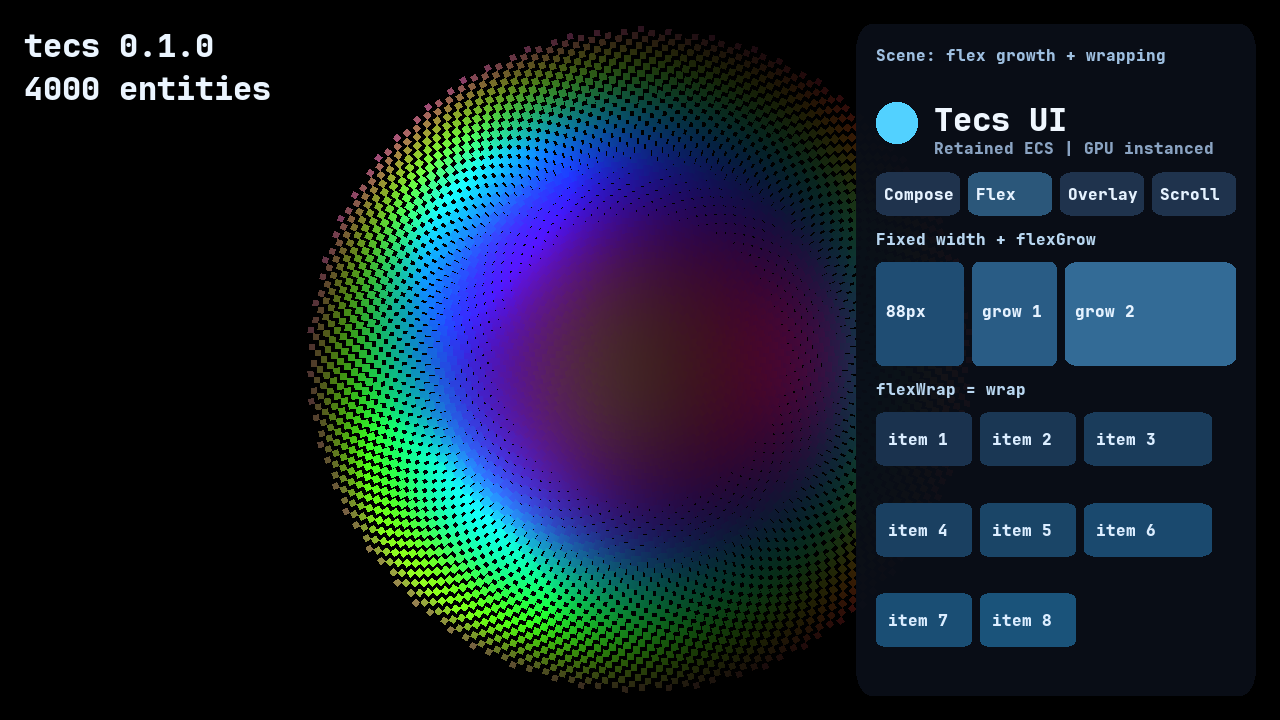 The first row compares a fixed `88px` child with `flexGrow` weights one and
two. The cards below use `flexWrap = "wrap"`, so the screenshot shows both
remaining-space distribution and line wrapping against one retained parent.
## Absolute positioning and depth
The first row compares a fixed `88px` child with `flexGrow` weights one and
two. The cards below use `flexWrap = "wrap"`, so the screenshot shows both
remaining-space distribution and line wrapping against one retained parent.
## Absolute positioning and depth
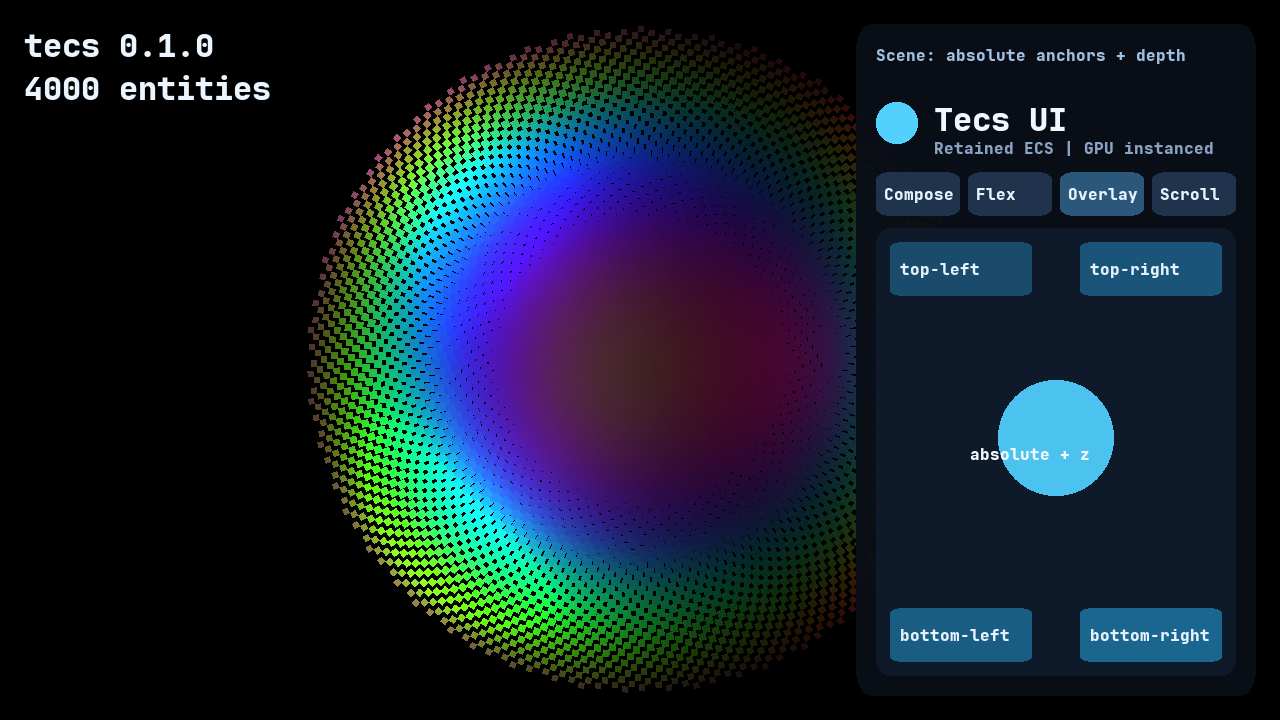 Absolute children anchor to their retained parent without consuming flex
space. Renderer depth remains a separate concern, which is why the center
circle and its label can sit above the four anchored cards.
## Scrolling and clipping
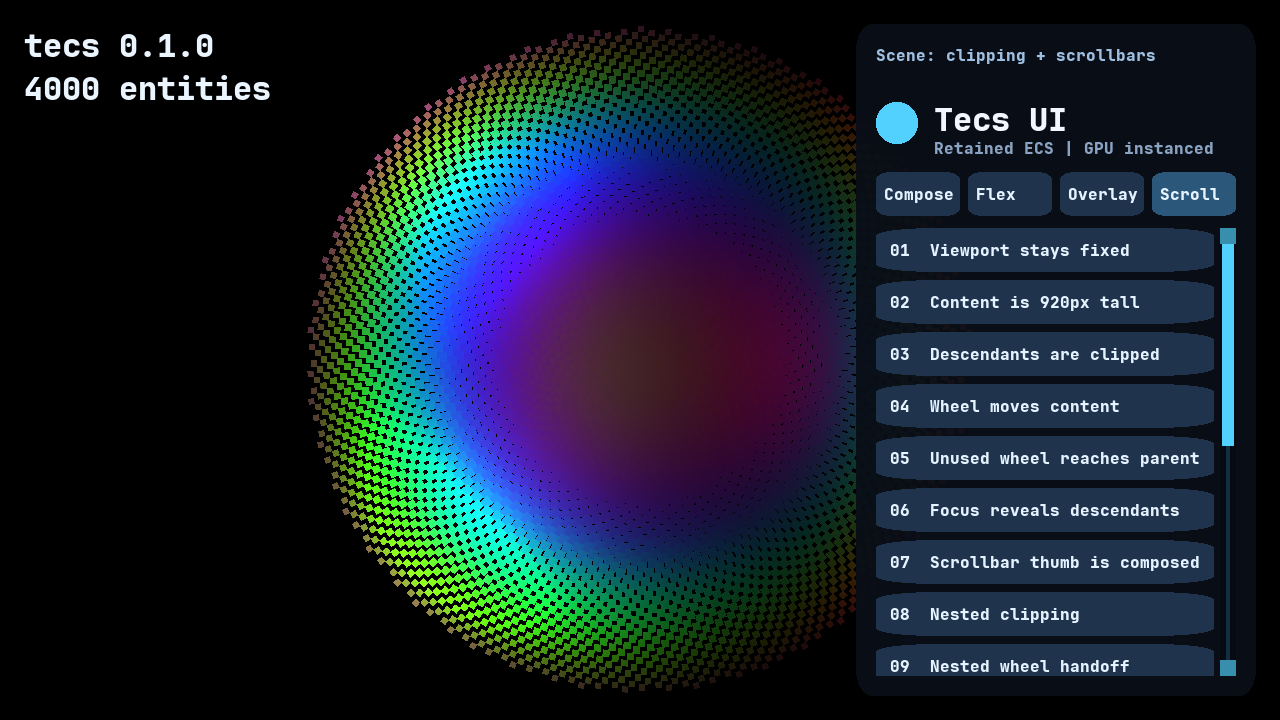
[`Scroll`](/modules/ui/#tecs.ui.Scroll) turns its entity's layout box into a
viewport. Its `x` and `y` move descendants, not the viewport entity itself.
Every nested viewport is intersected before the plugin assigns the existing
`tecs.gfx.Clip` component, so each drawable still carries one clip index in the
ordinary GPU instance. `firstClip` and `lastClip` reserve which of the
renderer’s 255 clip rectangles the UI owns.
Content extent includes negative, absolute, and nested descendants. Wheel
distance that a deepest viewport cannot consume passes to its ancestors.
`reveal` exposes a descendant programmatically, and `Scrollbar` derives a
composed thumb transform without adding a renderer primitive. Snapshots retain
scroll offsets and derive content extent again after load.
Absolute children anchor to their retained parent without consuming flex
space. Renderer depth remains a separate concern, which is why the center
circle and its label can sit above the four anchored cards.
## Scrolling and clipping
[`Scroll`](/modules/ui/#tecs.ui.Scroll) turns its entity's layout box into a
viewport. Its `x` and `y` move descendants, not the viewport entity itself.
Every nested viewport is intersected before the plugin assigns the existing
`tecs.gfx.Clip` component, so each drawable still carries one clip index in the
ordinary GPU instance. `firstClip` and `lastClip` reserve which of the
renderer’s 255 clip rectangles the UI owns.
Content extent includes negative, absolute, and nested descendants. Wheel
distance that a deepest viewport cannot consume passes to its ancestors.
`reveal` exposes a descendant programmatically, and `Scrollbar` derives a
composed thumb transform without adding a renderer primitive. Snapshots retain
scroll offsets and derive content extent again after load.
 Screen roots use logical UI coordinates and multiply clips by `pixelDensity`.
World roots project viewport corners through the renderer camera. Clip
rectangles stay axis-aligned; rotating a scroll viewport therefore does not
rotate its clip.
## Interaction and navigation
Passing the application to [`plugin`](/modules/ui/#tecs.ui.plugin) supplies its
renderer and input, enabling clip-aware hit testing. Manual options remain
available to tests and tools. [`Interaction`](/modules/ui/#tecs.ui.Interaction) opts
in a layout box, and [`InteractionState`](/modules/ui/#tecs.ui.InteractionState)
reports hover, per-pointer capture, drag, and focus without replacing
application state.
The plugin emits one bubbling [`Event`](/modules/ui/#tecs.ui.Event) at entity
addresses. Mouse and touch identities capture independently; releasing over a
captured target emits `"click"` and then `"activate"`, while draggable targets
emit semantic drag events. Tab and Shift-Tab traverse visible focusable
controls and repeat while held, and Return or Space emits `"activate"` at the
focused control.
Programmatic focus, focus reveal, and modal focus scopes use the same state. A
`"wheel"` event begins at the deepest viewport under the pointer; setting
`event.consumed = true` prevents both ancestor delivery and default scrolling.
Hit priority uses the renderer's layer-depth calculation. A depth tie prefers
the deeper UI node, explicit `Interaction.order`, and then stable retained
insertion order. `Style.style.order` independently orders layout siblings.
Give overlapping controls explicit orders and distinct renderer depth when
both their input and drawing order are meaningful.
## Complete application
Keep entity composition separate from plugin setup. This first block creates
a full-window root, a centered panel, an ordinary GPU-rendered background, and
intrinsically sized text:
```teal
local tecs = require("tecs")
local ui = tecs.ui
local ChildOf = tecs.ecs.ChildOf
local RelativeTransform2D = tecs.ecs.RelativeTransform2D
local Tint = tecs.gfx.Tint
local Material = tecs.gfx.Material
local Renderable2D = tecs.gfx.Renderable2D
local function spawnInterface(
world: tecs.World, app: tecs.Application, font: tecs.gfx.Font
)
local root = world:spawn(
ui.Style({
width = "100%",
height = "100%",
justifyContent = "center",
alignItems = "center",
}),
ui.Root("screen"),
tecs.Transform2D(0, 0, 0, 16)
)
local panel = world:spawn(
ui.Style({
width = 420,
height = 240,
flexDirection = "column",
padding = 20,
gap = 12,
}),
RelativeTransform2D(),
ChildOf(root)
)
world:spawn(
ui.Style({position = "absolute", inset = 0}),
ui.Paint(true),
RelativeTransform2D(0, 0, 0),
Tint(0.035, 0.055, 0.09, 0.96),
Material(tecs.gfx.materials.id("rounded"), 0.05),
Renderable2D(),
ChildOf(panel)
)
world:spawn(
ui.Style({maxWidth = "100%"}),
ui.Intrinsic("text", {wrap = true}),
RelativeTransform2D(0, 0, 1),
Tint(0.94, 0.97, 1.0, 1.0),
tecs.gfx.Text.new({
text = "This text and panel are ordinary ECS entities.",
font = font,
size = 16,
}),
ChildOf(panel)
)
end
```
The application plugin installs text and UI before a `Startup` system spawns
the retained entities. Passing `app` to `ui.plugin` supplies the renderer,
input, window size, and pixel density:
```teal
local function gamePlugin(world: tecs.World, app: tecs.Application)
tecs.gfx.layers.configure(
16,
{
sort = "z",
screenSpace = true,
unlit = true,
}
)
world:addPlugin(tecs.gfx.textPlugin({renderer = app.renderer}))
world:addPlugin(ui.plugin(app))
world:addSystem({
name = "game.SpawnInterface",
phase = tecs.ecs.phases.Startup,
run = function()
local font = tecs.gfx.newTTF({
source = "fonts/JetBrainsMono-ExtraBold.ttf",
name = "game-ui-16",
size = 16,
raster = "alpha",
}):wait().value
spawnInterface(world, app, font)
end,
})
end
return tecs.newApplication({plugin = gamePlugin})
```
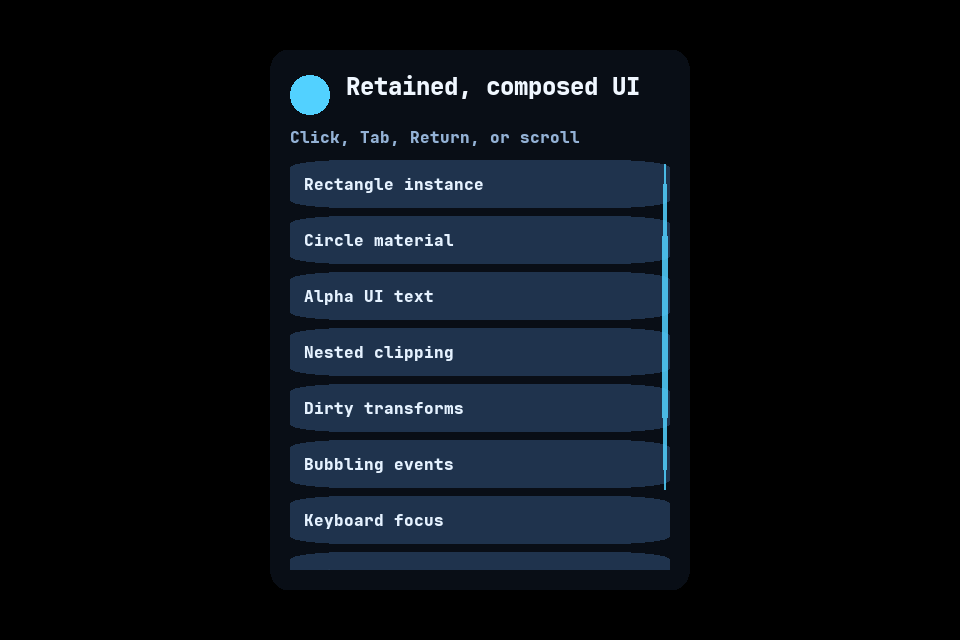
The standalone [`docs/examples/ui.tl`](https://github.com/tecs-dev/tecs/blob/main/docs/examples/ui.tl)
application expands that setup into a scrollable, keyboard-navigable panel:
Screen roots use logical UI coordinates and multiply clips by `pixelDensity`.
World roots project viewport corners through the renderer camera. Clip
rectangles stay axis-aligned; rotating a scroll viewport therefore does not
rotate its clip.
## Interaction and navigation
Passing the application to [`plugin`](/modules/ui/#tecs.ui.plugin) supplies its
renderer and input, enabling clip-aware hit testing. Manual options remain
available to tests and tools. [`Interaction`](/modules/ui/#tecs.ui.Interaction) opts
in a layout box, and [`InteractionState`](/modules/ui/#tecs.ui.InteractionState)
reports hover, per-pointer capture, drag, and focus without replacing
application state.
The plugin emits one bubbling [`Event`](/modules/ui/#tecs.ui.Event) at entity
addresses. Mouse and touch identities capture independently; releasing over a
captured target emits `"click"` and then `"activate"`, while draggable targets
emit semantic drag events. Tab and Shift-Tab traverse visible focusable
controls and repeat while held, and Return or Space emits `"activate"` at the
focused control.
Programmatic focus, focus reveal, and modal focus scopes use the same state. A
`"wheel"` event begins at the deepest viewport under the pointer; setting
`event.consumed = true` prevents both ancestor delivery and default scrolling.
Hit priority uses the renderer's layer-depth calculation. A depth tie prefers
the deeper UI node, explicit `Interaction.order`, and then stable retained
insertion order. `Style.style.order` independently orders layout siblings.
Give overlapping controls explicit orders and distinct renderer depth when
both their input and drawing order are meaningful.
## Complete application
Keep entity composition separate from plugin setup. This first block creates
a full-window root, a centered panel, an ordinary GPU-rendered background, and
intrinsically sized text:
```teal
local tecs = require("tecs")
local ui = tecs.ui
local ChildOf = tecs.ecs.ChildOf
local RelativeTransform2D = tecs.ecs.RelativeTransform2D
local Tint = tecs.gfx.Tint
local Material = tecs.gfx.Material
local Renderable2D = tecs.gfx.Renderable2D
local function spawnInterface(
world: tecs.World, app: tecs.Application, font: tecs.gfx.Font
)
local root = world:spawn(
ui.Style({
width = "100%",
height = "100%",
justifyContent = "center",
alignItems = "center",
}),
ui.Root("screen"),
tecs.Transform2D(0, 0, 0, 16)
)
local panel = world:spawn(
ui.Style({
width = 420,
height = 240,
flexDirection = "column",
padding = 20,
gap = 12,
}),
RelativeTransform2D(),
ChildOf(root)
)
world:spawn(
ui.Style({position = "absolute", inset = 0}),
ui.Paint(true),
RelativeTransform2D(0, 0, 0),
Tint(0.035, 0.055, 0.09, 0.96),
Material(tecs.gfx.materials.id("rounded"), 0.05),
Renderable2D(),
ChildOf(panel)
)
world:spawn(
ui.Style({maxWidth = "100%"}),
ui.Intrinsic("text", {wrap = true}),
RelativeTransform2D(0, 0, 1),
Tint(0.94, 0.97, 1.0, 1.0),
tecs.gfx.Text.new({
text = "This text and panel are ordinary ECS entities.",
font = font,
size = 16,
}),
ChildOf(panel)
)
end
```
The application plugin installs text and UI before a `Startup` system spawns
the retained entities. Passing `app` to `ui.plugin` supplies the renderer,
input, window size, and pixel density:
```teal
local function gamePlugin(world: tecs.World, app: tecs.Application)
tecs.gfx.layers.configure(
16,
{
sort = "z",
screenSpace = true,
unlit = true,
}
)
world:addPlugin(tecs.gfx.textPlugin({renderer = app.renderer}))
world:addPlugin(ui.plugin(app))
world:addSystem({
name = "game.SpawnInterface",
phase = tecs.ecs.phases.Startup,
run = function()
local font = tecs.gfx.newTTF({
source = "fonts/JetBrainsMono-ExtraBold.ttf",
name = "game-ui-16",
size = 16,
raster = "alpha",
}):wait().value
spawnInterface(world, app, font)
end,
})
end
return tecs.newApplication({plugin = gamePlugin})
```
The standalone [`docs/examples/ui.tl`](https://github.com/tecs-dev/tecs/blob/main/docs/examples/ui.tl)
application expands that setup into a scrollable, keyboard-navigable panel:
 ## Common recipes
### Stretch an ordinary rectangle over a layout box
Put the drawing component on an absolute child. `Paint(true)` copies the
computed width and height into its relative transform without scaling the
container's descendants:
```teal
local card = world:spawn(
ui.Style({width = 280, height = 120}),
RelativeTransform2D(),
ChildOf(panel)
)
world:spawn(
ui.Style({position = "absolute", inset = 0}),
ui.Paint(true),
RelativeTransform2D(0, 0, 0),
Tint(0.10, 0.17, 0.27, 1.0),
Material(tecs.gfx.materials.id("rounded"), 0.08),
Renderable2D(),
ChildOf(card)
)
```
### Load an image and preserve its aspect ratio
The asset loader decodes pixels asynchronously. The renderer registers them
and returns the ordinary sprite consumed by `Intrinsic("image")`:
```teal
tecs.assets.loadImage(
tecs.io.files.assetPath("images/portrait.png")
):map(function(image: tecs.assets.Image): tecs.gfx.Sprite
return app.renderer.sprites:registerImage(image)
end):onSettle(function(loaded: tecs.Future)
if loaded.status == "ready" then
world:spawn(
ui.Style({height = 64}),
ui.Intrinsic("image"),
ui.Paint(true),
RelativeTransform2D(0, 0, 2),
loaded.value,
Tint(1, 1, 1, 1),
Renderable2D(),
ChildOf(panel)
)
end
end)
```
### Create a clipped scrolling list
`Scroll` belongs on the fixed viewport. Its larger child creates overflow,
and the scrollbar is an ordinary composed drawing entity rather than a Taffy
or renderer primitive:
```teal
local viewport = world:spawn(
ui.Style({width = "100%", height = 240}),
ui.Scroll(),
RelativeTransform2D(),
ChildOf(panel)
)
local content = world:spawn(
ui.Style({
width = "100%",
height = 600,
flexDirection = "column",
gap = 8,
}),
RelativeTransform2D(),
ChildOf(viewport)
)
world:spawn(
ui.Scrollbar("vertical", 12, 4, 28),
ui.Interaction({focusable = false, draggable = true, order = 100}),
RelativeTransform2D(0, 0, 10),
Tint(0.32, 0.82, 1.0, 1.0),
Material(tecs.gfx.materials.id("rounded"), 0),
Renderable2D(),
ChildOf(viewport)
)
```
### Observe pointer and keyboard activation
`Interaction` makes the computed box selectable but draws nothing. Events
bubble through `ChildOf`, and Return or Space produces the same `activate`
event as a click:
```teal
local type uiTypes = require("tecs.ui")
local type UiEvent = uiTypes.Event
local button = world:spawn(
ui.Style({width = 180, height = 44}),
ui.Interaction({tabIndex = 1}),
RelativeTransform2D(),
ChildOf(content)
)
world:observe(
button,
ui.Event,
function(event: UiEvent)
if event.kind == "activate" then
print("activated via", event.source)
end
end
)
```
### Change a retained style
Use `getMut` only when a property actually changes. This dirties the retained
style once; unchanged frames do not parse the string or recompute the tree:
```teal
local style = world:getMut(panel, ui.Style)
style.style.width = "100%"
style.style.maxWidth = "480px"
```
### Focus and reveal a control
Programmatic focus uses the same state and navigation order as Tab. Focusing a
clipped descendant reveals it through every ancestor viewport:
```teal
ui.focus(world, button)
ui.reveal(world, button, "center")
local focused = ui.focused(world)
if focused == button then
ui.blur(world)
end
```
## Module contents
### Types
| Type | Kind | Description |
| --- | --- | --- |
| [`Event`](/modules/ui/#tecs.ui.Event) | record | Event reports one semantic interaction at an entity address. |
| [`EventKind`](/modules/ui/#tecs.ui.EventKind) | enum | Identifies one semantic UI interaction. |
| [`FocusScope`](/modules/ui/#tecs.ui.FocusScope) | record | FocusScope marks an entity that may become the active navigation boundary. |
| [`Interaction`](/modules/ui/#tecs.ui.Interaction) | record | Interaction makes one computed layout box a UI input target. |
| [`InteractionSource`](/modules/ui/#tecs.ui.InteractionSource) | enum | Identifies what initiated a semantic UI event. |
| [`InteractionState`](/modules/ui/#tecs.ui.InteractionState) | record | InteractionState reports transient state derived by the UI plugin. |
| [`Intrinsic`](/modules/ui/#tecs.ui.Intrinsic) | record | Intrinsic supplies cached leaf metrics to layout without a Lua callback. |
| [`IntrinsicSource`](/modules/ui/#tecs.ui.IntrinsicSource) | enum | Selects which leaf component owns natural dimensions. |
| [`Layout`](/modules/ui/#tecs.ui.Layout) | record | Layout reports the last box computed by retained layout. |
| [`Options`](/modules/ui/#tecs.ui.Options) | record | Options configures rendering, input, scrolling, and the owned clip-index range. |
| [`Overrides`](/modules/ui/#tecs.ui.Overrides) | record | Overrides changes scrolling and clip allocation without repeating an application's renderer and input. |
| [`Paint`](/modules/ui/#tecs.ui.Paint) | record | Paint controls how a drawing component consumes its layout box. |
| [`PointerType`](/modules/ui/#tecs.ui.PointerType) | enum | Identifies the pointer device associated with an event. |
| [`RevealAlign`](/modules/ui/#tecs.ui.RevealAlign) | enum | Selects where reveal places a descendant in each viewport. |
| [`Root`](/modules/ui/#tecs.ui.Root) | record | Root supplies the available space and coordinate mapping for one tree. |
| [`RootSizing`](/modules/ui/#tecs.ui.RootSizing) | enum | Selects where a root receives its available dimensions. |
| [`RootSpace`](/modules/ui/#tecs.ui.RootSpace) | enum | Selects whether a root uses screen or world coordinates. |
| [`Scroll`](/modules/ui/#tecs.ui.Scroll) | record | Scroll offsets descendants and clips them to this entity's layout box. |
| [`ScrollAxis`](/modules/ui/#tecs.ui.ScrollAxis) | enum | Selects the dimension controlled by a scrollbar thumb. |
| [`Scrollbar`](/modules/ui/#tecs.ui.Scrollbar) | record | Scrollbar derives one composed thumb transform from an ancestor viewport. |
| [`Style`](/modules/ui/#tecs.ui.Style) | record | Style stores the layout properties that place one UI entity. |
### Functions
| Function | Kind | Description |
| --- | --- | --- |
| [`blur`](/modules/ui/#tecs.ui.blur) | Static | Clears the world's focused interaction. |
| [`focus`](/modules/ui/#tecs.ui.focus) | Static | Moves focus to one enabled, focusable interaction. |
| [`focused`](/modules/ui/#tecs.ui.focused) | Static | Returns the world's focused interaction. |
| [`plugin`](/modules/ui/#tecs.ui.plugin) | Static | Returns a plugin that derives layout, transforms, clipping, and optional interaction from retained layout nodes. |
| [`popFocusScope`](/modules/ui/#tecs.ui.popFocusScope) | Static | Pops the active navigation boundary and restores its saved focus. |
| [`pushFocusScope`](/modules/ui/#tecs.ui.pushFocusScope) | Static | Pushes one modal navigation boundary and remembers the current focus. |
| [`reveal`](/modules/ui/#tecs.ui.reveal) | Static | Scrolls every ancestor viewport enough to expose one descendant. |
### Values
| Value | Type | Description |
| --- | --- | --- |
| [`Node`](/modules/ui/#tecs.ui.Node) | [`Component`](/modules/ecs/#tecs.ecs.Component) | Read-only. Exposes the tag that marks an entity as participating in UI layout. |
## Types
### tecs.ui.Event record
`Event` reports one semantic interaction at an entity address.
Read-only. Exposes the event type delivered to an interaction target
and its `ChildOf` ancestors.
```teal
record tecs.ui.Event is events.Event
kind: EventKind
target: integer
currentTarget: integer
x: number
y: number
button: integer
pointerId: string
pointerType: PointerType
deltaX: number
deltaY: number
source: InteractionSource
consumed: boolean
init: function(
event: Event,
kind: EventKind,
target: integer,
x: number,
y: number,
button: integer,
pointerId: string,
pointerType: PointerType,
deltaX: number,
deltaY: number,
source: InteractionSource
)
end
```
#### Interfaces
| Interface |
| --- |
| [`events.Event`](/modules/events/#tecs.events.Event) |
#### Examples
Handles pointer and keyboard activation through the same observer.
```teal
local tecs = require("tecs")
local ui = tecs.ui
local type uiTypes = require("tecs.ui")
local type UiEvent = uiTypes.Event
local world = tecs.ecs.newWorld()
local button = world:spawn(ui.Interaction({tabIndex = 1}))
world:observe(
button,
ui.Event,
function(event: UiEvent)
if event.kind == "activate" then
print("activated via", event.source)
end
end
)
```
#### tecs.ui.Event.kind field
Read-only. Reports `"pointerEnter"`, `"pointerLeave"`,
`"pointerDown"`, `"pointerMove"`, `"pointerUp"`, `"click"`, `"wheel"`,
`"focus"`, `"blur"`, `"activate"`, `"dragStart"`, `"dragMove"`,
`"dragEnd"`, or `"dragCancel"`.
```teal
tecs.ui.Event.kind: EventKind
```
#### tecs.ui.Event.target field
Read-only. Identifies the entity where dispatch began.
```teal
tecs.ui.Event.target: integer
```
#### tecs.ui.Event.currentTarget field
Read-only. Identifies the entity whose observers are currently
receiving this bubbling event.
```teal
tecs.ui.Event.currentTarget: integer
```
#### tecs.ui.Event.x field
Read-only. Reports the pointer's horizontal window coordinate.
```teal
tecs.ui.Event.x: number
```
#### tecs.ui.Event.y field
Read-only. Reports the pointer's vertical window coordinate.
```teal
tecs.ui.Event.y: number
```
#### tecs.ui.Event.button field
Read-only. Reports the mouse button, or zero for touch and events that
have no button.
```teal
tecs.ui.Event.button: integer
```
#### tecs.ui.Event.pointerId field
Read-only. Identifies `"mouse"` or one opaque touch identity. Keyboard,
controller, and programmatic events use the empty string.
```teal
tecs.ui.Event.pointerId: string
```
#### tecs.ui.Event.pointerType field
Read-only. Reports `"mouse"`, `"touch"`, `"pen"`, or `"none"`.
```teal
tecs.ui.Event.pointerType: PointerType
```
#### tecs.ui.Event.deltaX field
Read-only. Reports horizontal movement for pointer-move, drag, and
wheel events, or zero for other events.
```teal
tecs.ui.Event.deltaX: number
```
#### tecs.ui.Event.deltaY field
Read-only. Reports vertical movement for pointer-move, drag, and wheel
events, or zero for other events.
```teal
tecs.ui.Event.deltaY: number
```
#### tecs.ui.Event.source field
Read-only. Reports `"pointer"`, `"keyboard"`, `"controller"`, or
`"programmatic"` as the activation source.
```teal
tecs.ui.Event.source: InteractionSource
```
#### tecs.ui.Event.consumed field
Caller-writable. An observer may set this field to stop bubbling and
suppress the default wheel scroll.
```teal
tecs.ui.Event.consumed: boolean
```
#### tecs.ui.Event.init Static
```teal
function tecs.ui.Event.init(
event: Event,
kind: EventKind,
target: integer,
x: number,
y: number,
button: integer,
pointerId: string,
pointerType: PointerType,
deltaX: number,
deltaY: number,
source: InteractionSource
)
```
##### Arguments
| Name | Type | Description |
| --- | --- | --- |
| `event` | [`Event`](/modules/ui/#tecs.ui.Event) | |
| `kind` | [`EventKind`](/modules/ui/#tecs.ui.EventKind) | |
| `target` | `integer` | |
| `x` | `number` | |
| `y` | `number` | |
| `button` | `integer` | |
| `pointerId` | `string` | |
| `pointerType` | [`PointerType`](/modules/ui/#tecs.ui.PointerType) | |
| `deltaX` | `number` | |
| `deltaY` | `number` | |
| `source` | [`InteractionSource`](/modules/ui/#tecs.ui.InteractionSource) | |
##### Returns
None.
### tecs.ui.EventKind enum
Identifies one semantic UI interaction.
```teal
enum tecs.ui.EventKind
"activate"
"blur"
"click"
"dragCancel"
"dragEnd"
"dragMove"
"dragStart"
"focus"
"pointerDown"
"pointerEnter"
"pointerLeave"
"pointerMove"
"pointerUp"
"wheel"
end
```
### tecs.ui.FocusScope record
`FocusScope` marks an entity that may become the active navigation boundary.
Read-only. Exposes the marker used by `pushFocusScope`.
```teal
record tecs.ui.FocusScope is Component
end
```
#### Interfaces
| Interface |
| --- |
| [`Component`](/modules/ecs/#tecs.ecs.Component) |
#### Examples
Marks a dialog as a boundary for modal pointer and keyboard navigation.
```teal
local tecs = require("tecs")
local ui = tecs.ui
local world = tecs.ecs.newWorld()
local root = world:spawn(ui.Style({width = 1280, height = 720}))
local dialog = world:spawn(
ui.Style({width = 440, height = 260}),
ui.FocusScope(),
tecs.ecs.RelativeTransform2D(),
tecs.ecs.ChildOf(root)
)
```
### tecs.ui.Interaction record
`Interaction` makes one computed layout box a UI input target.
Read-only. Exposes the component that admits a layout box to hit
testing and keyboard navigation.
```teal
record tecs.ui.Interaction is Component
enabled: boolean
focusable: boolean
tabIndex: integer
order: integer
draggable: boolean
end
```
#### Interfaces
| Interface |
| --- |
| [`Component`](/modules/ecs/#tecs.ecs.Component) |
#### Examples
Creates a focusable control with an explicit Tab position.
```teal
local tecs = require("tecs")
local ui = tecs.ui
local world = tecs.ecs.newWorld()
local panel = world:spawn(ui.Style({width = 480, height = 360}))
local button = world:spawn(
ui.Style({width = 180, height = 44}),
ui.Interaction({tabIndex = 1, draggable = false}),
tecs.ecs.RelativeTransform2D(),
tecs.ecs.ChildOf(panel)
)
```
#### tecs.ui.Interaction.enabled field
Caller-writable. The caller controls whether hit testing and navigation
can select this entity. The default is true.
```teal
tecs.ui.Interaction.enabled: boolean
```
#### tecs.ui.Interaction.focusable field
Caller-writable. The caller controls whether clicking or keyboard
navigation can focus this entity. The default is true.
```teal
tecs.ui.Interaction.focusable: boolean
```
#### tecs.ui.Interaction.tabIndex field
Caller-writable. The caller orders keyboard focus. Positive values come
first in ascending order, zero values follow in authorial order, and
negative values skip keyboard navigation.
```teal
tecs.ui.Interaction.tabIndex: integer
```
#### tecs.ui.Interaction.order field
Caller-writable. The caller supplies an authorial tie-breaker for hit
testing and focus when controls share renderer depth and tab index.
Higher values hit later; lower values focus first.
```teal
tecs.ui.Interaction.order: integer
```
#### tecs.ui.Interaction.draggable field
Caller-writable. The caller enables semantic drag events after pointer
movement crosses the plugin's drag threshold.
```teal
tecs.ui.Interaction.draggable: boolean
```
### tecs.ui.InteractionSource enum
Identifies what initiated a semantic UI event.
```teal
enum tecs.ui.InteractionSource
"controller"
"keyboard"
"pointer"
"programmatic"
end
```
### tecs.ui.InteractionState record
`InteractionState` reports transient state derived by the UI plugin.
Read-only. Exposes transient hover, press, and focus state.
```teal
record tecs.ui.InteractionState is Component
hovered: boolean
pressed: boolean
focused: boolean
dragging: boolean
end
```
#### Interfaces
| Interface |
| --- |
| [`Component`](/modules/ecs/#tecs.ecs.Component) |
#### Examples
Reads transient focus state without dirtying the retained control.
```teal
local tecs = require("tecs")
local ui = tecs.ui
local world = tecs.ecs.newWorld()
local button = world:spawn(ui.Interaction({tabIndex = 1}))
local state = world:get(button, ui.InteractionState)
if state ~= nil and state.focused then
print("button has keyboard focus")
end
```
#### tecs.ui.InteractionState.hovered field
Engine-owned. The engine reports whether the pointer is over the
entity's visible, clipped box. Ordinary game code may read this field
to choose its visual state and must not write it.
```teal
tecs.ui.InteractionState.hovered: boolean
```
#### tecs.ui.InteractionState.pressed field
Engine-owned. The engine reports whether at least one pointer was
pressed on the entity and remains captured. Ordinary game code may read
this field and must not write it.
```teal
tecs.ui.InteractionState.pressed: boolean
```
#### tecs.ui.InteractionState.focused field
Engine-owned. The engine reports whether keyboard activation currently
targets the entity. Ordinary game code may read this field and must not
write it.
```teal
tecs.ui.InteractionState.focused: boolean
```
#### tecs.ui.InteractionState.dragging field
Engine-owned. The engine reports whether at least one captured pointer
is dragging this entity. Ordinary game code may read this field and
must not write it.
```teal
tecs.ui.InteractionState.dragging: boolean
```
### tecs.ui.Intrinsic record
`Intrinsic` supplies cached leaf metrics to layout without a Lua callback.
Read-only. Exposes cached custom, text, or image leaf measurement.
```teal
record tecs.ui.Intrinsic is Component
source: IntrinsicSource
width: number
height: number
minWidth: number
scale: number
wrap: boolean
end
```
#### Interfaces
| Interface |
| --- |
| [`Component`](/modules/ecs/#tecs.ecs.Component) |
#### Examples
Selects natural text, image, or custom leaf measurements.
```teal
local tecs = require("tecs")
local ui = tecs.ui
local wrappedText = ui.Intrinsic("text", {wrap = true})
local imageSize = ui.Intrinsic("image")
local customSize = ui.Intrinsic(
"custom", {width = 96, height = 28, minWidth = 48}
)
```
#### tecs.ui.Intrinsic.source field
Caller-writable. The caller selects `"custom"`, `"text"`, or
`"image"`. Text reads `tecs.gfx.text.Text`; image reads
`tecs.components.Sprite`; custom reads the dimensions below.
```teal
tecs.ui.Intrinsic.source: IntrinsicSource
```
#### tecs.ui.Intrinsic.width field
Caller-writable. The caller supplies the preferred custom width in
logical units. Text and image sources ignore this field.
```teal
tecs.ui.Intrinsic.width: number
```
#### tecs.ui.Intrinsic.height field
Caller-writable. The caller supplies the preferred custom height in
logical units. Text and image sources ignore this field.
```teal
tecs.ui.Intrinsic.height: number
```
#### tecs.ui.Intrinsic.minWidth field
Caller-writable. The caller supplies the custom minimum-content width.
Zero uses `width`. Text derives its longest unbroken run and image
sources preserve their aspect ratio instead.
```teal
tecs.ui.Intrinsic.minWidth: number
```
#### tecs.ui.Intrinsic.scale field
Caller-writable. The caller scales text or source-image units into UI
units. The default is one.
```teal
tecs.ui.Intrinsic.scale: number
```
#### tecs.ui.Intrinsic.wrap field
Caller-writable. The caller lets Taffy choose a text line width and
lets the plugin write that result to `Text.wrapWidth`. Other sources
ignore this field.
```teal
tecs.ui.Intrinsic.wrap: boolean
```
### tecs.ui.IntrinsicSource enum
Selects which leaf component owns natural dimensions.
```teal
enum tecs.ui.IntrinsicSource
"custom"
"image"
"text"
end
```
### tecs.ui.Layout record
`Layout` reports the last box computed by retained layout.
Read-only. Exposes the component that reports a computed box without
becoming a drawing primitive.
```teal
record tecs.ui.Layout is Component
x: number
y: number
width: number
height: number
end
```
#### Interfaces
| Interface |
| --- |
| [`Component`](/modules/ecs/#tecs.ecs.Component) |
#### Examples
Reads the final logical size after the UI layout phase.
```teal
local tecs = require("tecs")
local ui = tecs.ui
local world = tecs.ecs.newWorld()
local panel = world:spawn(ui.Style({width = 480, height = 320}))
local box = world:get(panel, ui.Layout)
if box ~= nil then
print(("%.0f x %.0f"):format(box.width, box.height))
end
```
#### tecs.ui.Layout.x field
Read-only. The engine reports the box's X offset from its parent.
```teal
tecs.ui.Layout.x: number
```
#### tecs.ui.Layout.y field
Read-only. The engine reports the box's Y offset from its parent.
```teal
tecs.ui.Layout.y: number
```
#### tecs.ui.Layout.width field
Read-only. The engine reports the box width in logical units.
```teal
tecs.ui.Layout.width: number
```
#### tecs.ui.Layout.height field
Read-only. The engine reports the box height in logical units.
```teal
tecs.ui.Layout.height: number
```
### tecs.ui.Options record
`Options` configures rendering, input, scrolling, and the owned
clip-index range.
```teal
record tecs.ui.Options
renderer: Renderer
firstClip: integer
lastClip: integer
input: any
layer: any
wheelStep: number
dragThreshold: number
end
```
#### tecs.ui.Options.renderer field
Caller-writable. The caller supplies the renderer whose camera and GPU
clip table the UI uses.
```teal
tecs.ui.Options.renderer: Renderer
```
#### tecs.ui.Options.firstClip field
Caller-writable. The caller reserves the first UI-owned clip index.
The default is one.
```teal
tecs.ui.Options.firstClip: integer
```
#### tecs.ui.Options.lastClip field
Caller-writable. The caller reserves the last UI-owned clip index.
The default is 255.
```teal
tecs.ui.Options.lastClip: integer
```
#### tecs.ui.Options.input field
Caller-writable. The caller supplies the application's folded input to
enable hit testing, scrolling, focus, and activation. Omitting it
installs layout and clipping only.
```teal
tecs.ui.Options.input: any
```
#### tecs.ui.Options.layer field
Caller-writable. The caller supplies the input layer the UI may read.
Omitting it reads the base layer.
```teal
tecs.ui.Options.layer: any
```
#### tecs.ui.Options.wheelStep field
Caller-writable. The caller sets logical scroll units per wheel unit.
The default is 40.
```teal
tecs.ui.Options.wheelStep: number
```
#### tecs.ui.Options.dragThreshold field
Caller-writable. The caller sets pointer movement in logical units
before a draggable capture emits `"dragStart"`. The default is four.
```teal
tecs.ui.Options.dragThreshold: number
```
### tecs.ui.Overrides record
`Overrides` changes scrolling and clip allocation without repeating an
application's renderer and input.
```teal
record tecs.ui.Overrides
firstClip: integer
lastClip: integer
layer: any
wheelStep: number
dragThreshold: number
end
```
#### tecs.ui.Overrides.firstClip field
Caller-writable. The caller reserves the first UI-owned clip index.
The default is one.
```teal
tecs.ui.Overrides.firstClip: integer
```
#### tecs.ui.Overrides.lastClip field
Caller-writable. The caller reserves the last UI-owned clip index.
The default is 255.
```teal
tecs.ui.Overrides.lastClip: integer
```
#### tecs.ui.Overrides.layer field
Caller-writable. The caller supplies the input layer the UI may read.
Omitting it reads the base layer.
```teal
tecs.ui.Overrides.layer: any
```
#### tecs.ui.Overrides.wheelStep field
Caller-writable. The caller sets logical scroll units per wheel unit.
The default is 40.
```teal
tecs.ui.Overrides.wheelStep: number
```
#### tecs.ui.Overrides.dragThreshold field
Caller-writable. The caller sets pointer movement in logical units
before a draggable capture emits `"dragStart"`. The default is four.
```teal
tecs.ui.Overrides.dragThreshold: number
```
### tecs.ui.Paint record
`Paint` controls how a drawing component consumes its layout box.
Read-only. Exposes the component that optionally stretches an existing
primitive to its computed box.
```teal
record tecs.ui.Paint is Component
stretch: boolean
end
```
#### Interfaces
| Interface |
| --- |
| [`Component`](/modules/ecs/#tecs.ecs.Component) |
#### Examples
Stretches an ordinary rounded rectangle over its retained layout box.
```teal
local tecs = require("tecs")
local ui = tecs.ui
local world = tecs.ecs.newWorld()
local panel = world:spawn(ui.Style({width = 480, height = 320}))
world:spawn(
ui.Style({position = "absolute", inset = 0}),
ui.Paint(true),
tecs.ecs.RelativeTransform2D(0, 0, 1),
tecs.gfx.Tint(0.1, 0.2, 0.3, 1),
tecs.gfx.Material(tecs.gfx.materials.id("rounded"), 0.1),
tecs.gfx.Renderable2D(),
tecs.ecs.ChildOf(panel)
)
```
#### tecs.ui.Paint.stretch field
Caller-writable. The caller enables `stretch` to copy the layout width
and height into `RelativeTransform2D.scaleX` and `scaleY`.
```teal
tecs.ui.Paint.stretch: boolean
```
### tecs.ui.PointerType enum
Identifies the pointer device associated with an event.
```teal
enum tecs.ui.PointerType
"mouse"
"none"
"pen"
"touch"
end
```
### tecs.ui.RevealAlign enum
Selects where `reveal` places a descendant in each viewport.
```teal
enum tecs.ui.RevealAlign
"center"
"end"
"nearest"
"start"
end
```
### tecs.ui.Root record
`Root` supplies the available space and coordinate mapping for one tree.
Read-only. Exposes the component that gives a retained UI tree its
available size and coordinate space.
```teal
record tecs.ui.Root is Component
space: RootSpace
width: number
height: number
pixelDensity: number
sizing: RootSizing
end
```
#### Interfaces
| Interface |
| --- |
| [`Component`](/modules/ecs/#tecs.ecs.Component) |
#### Examples
Creates a screen root that follows the application window automatically.
```teal
local tecs = require("tecs")
local ui = tecs.ui
local world = tecs.ecs.newWorld()
local root = world:spawn(
ui.Style({width = "100%", height = "100%"}),
ui.Root("screen"),
tecs.Transform2D(0, 0, 0, 16)
)
```
#### tecs.ui.Root.space field
Caller-writable. The caller chooses `"screen"` for logical screen
coordinates or `"world"` for coordinates projected by the camera.
```teal
tecs.ui.Root.space: RootSpace
```
#### tecs.ui.Root.width field
Caller-writable. The caller supplies the layout root width. An
application-backed screen root with automatic sizing follows the
logical window width; a camera-sized world root derives world units
from the physical viewport and camera zoom.
```teal
tecs.ui.Root.width: number
```
#### tecs.ui.Root.height field
Caller-writable. The caller supplies the layout root height. An
application-backed screen root with automatic sizing follows the
logical window height; a camera-sized world root derives world units
from the physical viewport and camera zoom.
```teal
tecs.ui.Root.height: number
```
#### tecs.ui.Root.pixelDensity field
Caller-writable. The caller supplies target pixels per logical point.
The default is one. Automatic screen and camera-sized world roots
follow the window's current pixel density.
```teal
tecs.ui.Root.pixelDensity: number
```
#### tecs.ui.Root.sizing field
Caller-writable. The caller selects `"auto"` for the standard behavior,
`"manual"` to preserve every authored field, or `"camera"` on a world
root to derive its extent and transform from the active camera.
`"auto"` follows the window for screen roots and is manual for world
roots.
```teal
tecs.ui.Root.sizing: RootSizing
```
### tecs.ui.RootSizing enum
Selects where a root receives its available dimensions.
```teal
enum tecs.ui.RootSizing
"auto"
"camera"
"manual"
end
```
### tecs.ui.RootSpace enum
Selects whether a root uses screen or world coordinates.
```teal
enum tecs.ui.RootSpace
"screen"
"world"
end
```
### tecs.ui.Scroll record
`Scroll` offsets descendants and clips them to this entity's layout box.
Read-only. Exposes the component that offsets descendants and clips
their existing GPU instances.
```teal
record tecs.ui.Scroll is Component
x: number
y: number
contentWidth: number
contentHeight: number
contentX: number
contentY: number
end
```
#### Interfaces
| Interface |
| --- |
| [`Component`](/modules/ecs/#tecs.ecs.Component) |
#### Examples
Creates a fixed viewport and changes its retained vertical offset.
```teal
local tecs = require("tecs")
local ui = tecs.ui
local world = tecs.ecs.newWorld()
local panel = world:spawn(ui.Style({width = 480, height = 360}))
local viewport = world:spawn(
ui.Style({width = "100%", height = 240}),
ui.Scroll(),
tecs.ecs.RelativeTransform2D(),
tecs.ecs.ChildOf(panel)
)
local scroll = world:getMut(viewport, ui.Scroll)
scroll.y = scroll.y + 80
```
#### tecs.ui.Scroll.x field
Caller-writable. The caller supplies the horizontal scroll offset in
logical units.
```teal
tecs.ui.Scroll.x: number
```
#### tecs.ui.Scroll.y field
Caller-writable. The caller supplies the vertical scroll offset in
logical units.
```teal
tecs.ui.Scroll.y: number
```
#### tecs.ui.Scroll.contentWidth field
Engine-owned. The engine reports the horizontal extent of retained
content, including nested and absolute descendants. Ordinary game code
should ignore this field.
```teal
tecs.ui.Scroll.contentWidth: number
```
#### tecs.ui.Scroll.contentHeight field
Engine-owned. The engine reports the vertical extent of retained
content, including nested and absolute descendants. Ordinary game code
should ignore this field.
```teal
tecs.ui.Scroll.contentHeight: number
```
#### tecs.ui.Scroll.contentX field
Engine-owned. The engine reports the smallest horizontal content
coordinate, including negative-positioned descendants. Ordinary game
code should ignore this field.
```teal
tecs.ui.Scroll.contentX: number
```
#### tecs.ui.Scroll.contentY field
Engine-owned. The engine reports the smallest vertical content
coordinate, including negative-positioned descendants. Ordinary game
code should ignore this field.
```teal
tecs.ui.Scroll.contentY: number
```
### tecs.ui.ScrollAxis enum
Selects the dimension controlled by a scrollbar thumb.
```teal
enum tecs.ui.ScrollAxis
"horizontal"
"vertical"
end
```
### tecs.ui.Scrollbar record
`Scrollbar` derives one composed thumb transform from an ancestor viewport.
Read-only. Exposes a composed scrollbar thumb driven by its parent
viewport.
```teal
record tecs.ui.Scrollbar is Component
axis: ScrollAxis
thickness: number
inset: number
minLength: number
end
```
#### Interfaces
| Interface |
| --- |
| [`Component`](/modules/ecs/#tecs.ecs.Component) |
#### Examples
Composes a square vertical thumb from ordinary renderer components.
```teal
local tecs = require("tecs")
local ui = tecs.ui
local world = tecs.ecs.newWorld()
local viewport = world:spawn(
ui.Style({width = 480, height = 240}), ui.Scroll()
)
world:spawn(
ui.Scrollbar("vertical", 12, 4, 28),
ui.Interaction({focusable = false, draggable = true}),
tecs.ecs.RelativeTransform2D(0, 0, 10),
tecs.gfx.Tint(0.32, 0.82, 1, 1),
tecs.gfx.Material(tecs.gfx.materials.id("rounded"), 0),
tecs.gfx.Renderable2D(),
tecs.ecs.ChildOf(viewport)
)
```
#### tecs.ui.Scrollbar.axis field
Caller-writable. The caller selects `"horizontal"` or `"vertical"`.
```teal
tecs.ui.Scrollbar.axis: ScrollAxis
```
#### tecs.ui.Scrollbar.thickness field
Caller-writable. The caller sets the thumb thickness in logical units.
```teal
tecs.ui.Scrollbar.thickness: number
```
#### tecs.ui.Scrollbar.inset field
Caller-writable. The caller leaves this much room inside each end of
the viewport track.
```teal
tecs.ui.Scrollbar.inset: number
```
#### tecs.ui.Scrollbar.minLength field
Caller-writable. The caller sets the smallest thumb length in logical
units.
```teal
tecs.ui.Scrollbar.minLength: number
```
### tecs.ui.Style record
`Style` stores the layout properties that place one UI entity.
Read-only. Exposes the component that supplies retained layout properties
and adds `Layout` and `tecs.gfx.Clip`.
```teal
record tecs.ui.Style is Component
style: {string: any}
end
```
#### Interfaces
| Interface |
| --- |
| [`Component`](/modules/ecs/#tecs.ecs.Component) |
#### Examples
Builds a column whose width follows its parent up to 480 logical pixels.
```teal
local tecs = require("tecs")
local ui = tecs.ui
local world = tecs.ecs.newWorld()
local root = world:spawn(ui.Style({width = 1280, height = 720}))
local panel = world:spawn(
ui.Style({
width = "100%",
maxWidth = 480,
flexDirection = "column",
padding = 20,
gap = 12,
}),
tecs.ecs.RelativeTransform2D(),
tecs.ecs.ChildOf(root)
)
```
#### tecs.ui.Style.style field
Caller-writable. The caller supplies a table and marks `Style` dirty
after mutating it. Numbers and `"24px"` strings use logical UI pixels,
`"50%"` is parent-relative, and `"auto"` selects automatic sizing.
Invalid strings raise when the plugin synchronizes the style. The
older `{value=number, unit="percent"}` and `unit="points"` table forms
remain supported.
Supported keys are `display`, `position`, `flexDirection`, `flexWrap`,
`justifyContent`, `alignItems`, `alignContent`, `flexGrow`,
`flexShrink`, `flexBasis`, `width`, `height`, `minWidth`, `minHeight`,
`maxWidth`, `maxHeight`, `margin`, `padding`, `border`, `gap`,
`rowGap`, `inset`, and the Tecs-only integer `order` used to retain
authorial sibling order. Edge values accept one dimension or a table
with `left`, `right`, `top`, and `bottom`.
```teal
tecs.ui.Style.style: {string: any}
```
## Functions
### tecs.ui.blur Static
Clears the world's focused interaction.
```teal
function tecs.ui.blur(world: World): boolean
```
#### Arguments
| Name | Type | Description |
| --- | --- | --- |
| `world` | [`World`](/modules/ecs/#tecs.World) | The caller supplies a world with the UI plugin. |
#### Returns
| Type | Description |
| --- | --- |
| `boolean` | Returns false when the plugin is missing. |
#### Examples
Clears the current keyboard focus when one exists.
```teal
local tecs = require("tecs")
local ui = tecs.ui
local world = tecs.ecs.newWorld()
if ui.focused(world) ~= nil then
ui.blur(world)
end
```
### tecs.ui.focus Static
Moves focus to one enabled, focusable interaction.
```teal
function tecs.ui.focus(
world: World, entity: integer
): boolean
```
#### Arguments
| Name | Type | Description |
| --- | --- | --- |
| `world` | [`World`](/modules/ecs/#tecs.World) | The caller supplies a world with the UI plugin. |
| `entity` | `integer` | The caller supplies the interaction to focus. |
#### Returns
| Type | Description |
| --- | --- |
| `boolean` | Returns false when the plugin is missing or the entity cannot receive focus. |
#### Examples
Moves keyboard focus to an enabled, focusable control.
```teal
local tecs = require("tecs")
local ui = tecs.ui
local world = tecs.ecs.newWorld()
local saveButton = world:spawn(ui.Interaction({tabIndex = 1}))
if not ui.focus(world, saveButton) then
print("save button cannot receive focus")
end
```
### tecs.ui.focused Static
Returns the world's focused interaction.
```teal
function tecs.ui.focused(world: World): integer
```
#### Arguments
| Name | Type | Description |
| --- | --- | --- |
| `world` | [`World`](/modules/ecs/#tecs.World) | The caller supplies a world with or without the UI plugin. |
#### Returns
| Type | Description |
| --- | --- |
| `integer` | Returns the focused entity, or nil when nothing is focused. |
#### Examples
Finds the interaction that currently owns keyboard focus.
```teal
local tecs = require("tecs")
local ui = tecs.ui
local world = tecs.ecs.newWorld()
local current = ui.focused(world)
if current ~= nil then
print("focused entity", current)
end
```
### tecs.ui.plugin Static
Returns a plugin that derives layout, transforms, clipping, and
optional interaction from retained layout nodes.
The plugin owns every renderer clip index from `firstClip` through
`lastClip`, inclusive. Reserve a smaller range when another system also
calls `renderer.sprites:setClipRegion`. Exhausting the range raises rather than
drawing unclipped content.
Passing an [`Application`](/modules/Application/) supplies its
renderer, input, and window. The plugin samples the viewport initially,
then observes platform resize, pixel-size, display, and display-scale
events at world address zero. It coalesces them and refreshes automatic
roots before layout without polling the window on unchanged frames. The
optional second argument overrides clip allocation, the input layer,
and wheel distance. Passing `Options` directly preserves manual wiring
for tests, tools, and worlds not owned by an application. When input is
present, the plugin reads its configured layer in `PreUpdate`. It uses
the hit geometry derived after the previous frame's layout and
clipping, which is the geometry the player was shown when the input
arrived.
```teal
function tecs.ui.plugin(
source: any, overrides: Overrides
): function(World)
```
#### Arguments
| Name | Type | Description |
| --- | --- | --- |
| `source` | `any` | The caller supplies an application or manually wired options containing a renderer. |
| `overrides` | [`Overrides`](/modules/ui/#tecs.ui.Overrides) | The caller may override source defaults without repeating its renderer and input. |
#### Returns
| Type | Description |
| --- | --- |
| `function(`[`World`](/modules/ecs/#tecs.World)`)` | Returns a plugin for `world:addPlugin`. Each world receives a separate retained tree and clip allocator. |
#### Examples
Installs UI with explicit dependencies in a test or manually constructed world.
```teal
local tecs = require("tecs")
local type Renderer = require("tecs.Renderer")
local type inputTypes = require("tecs.input")
local function installManualUi(
world: tecs.World, renderer: Renderer, input: inputTypes.Input
)
world:addPlugin(tecs.ui.plugin({
renderer = renderer,
input = input,
firstClip = 32,
lastClip = 63,
}))
end
```
Installs UI from an application so roots follow its window and input.
```teal
local tecs = require("tecs")
local function gamePlugin(world: tecs.World, app: tecs.Application)
world:addPlugin(tecs.ui.plugin(
app,
{
wheelStep = 36,
dragThreshold = 4,
}
))
end
```
### tecs.ui.popFocusScope Static
Pops the active navigation boundary and restores its saved focus.
```teal
function tecs.ui.popFocusScope(world: World, scope: integer): boolean
```
#### Arguments
| Name | Type | Description |
| --- | --- | --- |
| `world` | [`World`](/modules/ecs/#tecs.World) | The caller supplies a world with the UI plugin. |
| `scope` | `integer` | The caller may require a particular active scope. |
#### Returns
| Type | Description |
| --- | --- |
| `boolean` | Returns false when the plugin is missing or the requested scope is not active. |
#### Examples
Closes the active modal boundary and restores its saved focus.
```teal
local tecs = require("tecs")
local ui = tecs.ui
local world = tecs.ecs.newWorld()
local dialog = world:spawn(ui.FocusScope())
if not ui.popFocusScope(world, dialog) then
print("dialog is not the active focus scope")
end
```
### tecs.ui.pushFocusScope Static
Pushes one modal navigation boundary and remembers the current focus.
```teal
function tecs.ui.pushFocusScope(world: World, scope: integer): boolean
```
#### Arguments
| Name | Type | Description |
| --- | --- | --- |
| `world` | [`World`](/modules/ecs/#tecs.World) | The caller supplies a world with the UI plugin. |
| `scope` | `integer` | The caller supplies an entity carrying `FocusScope`. |
#### Returns
| Type | Description |
| --- | --- |
| `boolean` | Returns false when the plugin or scope is missing. |
#### Examples
Activates a modal scope and focuses its first control.
```teal
local tecs = require("tecs")
local ui = tecs.ui
local world = tecs.ecs.newWorld()
local dialog = world:spawn(ui.FocusScope())
local firstDialogControl = world:spawn(
ui.Interaction({tabIndex = 1}), tecs.ecs.ChildOf(dialog)
)
if ui.pushFocusScope(world, dialog) then
ui.focus(world, firstDialogControl)
end
```
### tecs.ui.reveal Static
Scrolls every ancestor viewport enough to expose one descendant.
```teal
function tecs.ui.reveal(
world: World, entity: integer, align: RevealAlign
): boolean
```
#### Arguments
| Name | Type | Description |
| --- | --- | --- |
| `world` | [`World`](/modules/ecs/#tecs.World) | The caller supplies a world with the UI plugin. |
| `entity` | `integer` | The caller supplies a retained UI descendant. |
| `align` | [`RevealAlign`](/modules/ui/#tecs.ui.RevealAlign) | The caller selects `"nearest"`, `"start"`, `"center"`, or `"end"`; omission selects `"nearest"`. |
#### Returns
| Type | Description |
| --- | --- |
| `boolean` | Returns false when the plugin or layout is missing. |
#### Examples
Centers a selected row through every retained ancestor viewport.
```teal
local tecs = require("tecs")
local ui = tecs.ui
local world = tecs.ecs.newWorld()
local viewport = world:spawn(
ui.Style({height = 240}), ui.Scroll()
)
local selectedRow = world:spawn(
ui.Style({height = 44}),
tecs.ecs.RelativeTransform2D(),
tecs.ecs.ChildOf(viewport)
)
if not ui.reveal(world, selectedRow, "center") then
print("selected row has no retained layout")
end
```
## Values
### tecs.ui.Node variable
Read-only. Exposes the tag that marks an entity as participating in UI
layout. `Style`, `Root`, and `Scroll` add it automatically.
```teal
tecs.ui.Node: Component
```
## Common recipes
### Stretch an ordinary rectangle over a layout box
Put the drawing component on an absolute child. `Paint(true)` copies the
computed width and height into its relative transform without scaling the
container's descendants:
```teal
local card = world:spawn(
ui.Style({width = 280, height = 120}),
RelativeTransform2D(),
ChildOf(panel)
)
world:spawn(
ui.Style({position = "absolute", inset = 0}),
ui.Paint(true),
RelativeTransform2D(0, 0, 0),
Tint(0.10, 0.17, 0.27, 1.0),
Material(tecs.gfx.materials.id("rounded"), 0.08),
Renderable2D(),
ChildOf(card)
)
```
### Load an image and preserve its aspect ratio
The asset loader decodes pixels asynchronously. The renderer registers them
and returns the ordinary sprite consumed by `Intrinsic("image")`:
```teal
tecs.assets.loadImage(
tecs.io.files.assetPath("images/portrait.png")
):map(function(image: tecs.assets.Image): tecs.gfx.Sprite
return app.renderer.sprites:registerImage(image)
end):onSettle(function(loaded: tecs.Future)
if loaded.status == "ready" then
world:spawn(
ui.Style({height = 64}),
ui.Intrinsic("image"),
ui.Paint(true),
RelativeTransform2D(0, 0, 2),
loaded.value,
Tint(1, 1, 1, 1),
Renderable2D(),
ChildOf(panel)
)
end
end)
```
### Create a clipped scrolling list
`Scroll` belongs on the fixed viewport. Its larger child creates overflow,
and the scrollbar is an ordinary composed drawing entity rather than a Taffy
or renderer primitive:
```teal
local viewport = world:spawn(
ui.Style({width = "100%", height = 240}),
ui.Scroll(),
RelativeTransform2D(),
ChildOf(panel)
)
local content = world:spawn(
ui.Style({
width = "100%",
height = 600,
flexDirection = "column",
gap = 8,
}),
RelativeTransform2D(),
ChildOf(viewport)
)
world:spawn(
ui.Scrollbar("vertical", 12, 4, 28),
ui.Interaction({focusable = false, draggable = true, order = 100}),
RelativeTransform2D(0, 0, 10),
Tint(0.32, 0.82, 1.0, 1.0),
Material(tecs.gfx.materials.id("rounded"), 0),
Renderable2D(),
ChildOf(viewport)
)
```
### Observe pointer and keyboard activation
`Interaction` makes the computed box selectable but draws nothing. Events
bubble through `ChildOf`, and Return or Space produces the same `activate`
event as a click:
```teal
local type uiTypes = require("tecs.ui")
local type UiEvent = uiTypes.Event
local button = world:spawn(
ui.Style({width = 180, height = 44}),
ui.Interaction({tabIndex = 1}),
RelativeTransform2D(),
ChildOf(content)
)
world:observe(
button,
ui.Event,
function(event: UiEvent)
if event.kind == "activate" then
print("activated via", event.source)
end
end
)
```
### Change a retained style
Use `getMut` only when a property actually changes. This dirties the retained
style once; unchanged frames do not parse the string or recompute the tree:
```teal
local style = world:getMut(panel, ui.Style)
style.style.width = "100%"
style.style.maxWidth = "480px"
```
### Focus and reveal a control
Programmatic focus uses the same state and navigation order as Tab. Focusing a
clipped descendant reveals it through every ancestor viewport:
```teal
ui.focus(world, button)
ui.reveal(world, button, "center")
local focused = ui.focused(world)
if focused == button then
ui.blur(world)
end
```
## Module contents
### Types
| Type | Kind | Description |
| --- | --- | --- |
| [`Event`](/modules/ui/#tecs.ui.Event) | record | Event reports one semantic interaction at an entity address. |
| [`EventKind`](/modules/ui/#tecs.ui.EventKind) | enum | Identifies one semantic UI interaction. |
| [`FocusScope`](/modules/ui/#tecs.ui.FocusScope) | record | FocusScope marks an entity that may become the active navigation boundary. |
| [`Interaction`](/modules/ui/#tecs.ui.Interaction) | record | Interaction makes one computed layout box a UI input target. |
| [`InteractionSource`](/modules/ui/#tecs.ui.InteractionSource) | enum | Identifies what initiated a semantic UI event. |
| [`InteractionState`](/modules/ui/#tecs.ui.InteractionState) | record | InteractionState reports transient state derived by the UI plugin. |
| [`Intrinsic`](/modules/ui/#tecs.ui.Intrinsic) | record | Intrinsic supplies cached leaf metrics to layout without a Lua callback. |
| [`IntrinsicSource`](/modules/ui/#tecs.ui.IntrinsicSource) | enum | Selects which leaf component owns natural dimensions. |
| [`Layout`](/modules/ui/#tecs.ui.Layout) | record | Layout reports the last box computed by retained layout. |
| [`Options`](/modules/ui/#tecs.ui.Options) | record | Options configures rendering, input, scrolling, and the owned clip-index range. |
| [`Overrides`](/modules/ui/#tecs.ui.Overrides) | record | Overrides changes scrolling and clip allocation without repeating an application's renderer and input. |
| [`Paint`](/modules/ui/#tecs.ui.Paint) | record | Paint controls how a drawing component consumes its layout box. |
| [`PointerType`](/modules/ui/#tecs.ui.PointerType) | enum | Identifies the pointer device associated with an event. |
| [`RevealAlign`](/modules/ui/#tecs.ui.RevealAlign) | enum | Selects where reveal places a descendant in each viewport. |
| [`Root`](/modules/ui/#tecs.ui.Root) | record | Root supplies the available space and coordinate mapping for one tree. |
| [`RootSizing`](/modules/ui/#tecs.ui.RootSizing) | enum | Selects where a root receives its available dimensions. |
| [`RootSpace`](/modules/ui/#tecs.ui.RootSpace) | enum | Selects whether a root uses screen or world coordinates. |
| [`Scroll`](/modules/ui/#tecs.ui.Scroll) | record | Scroll offsets descendants and clips them to this entity's layout box. |
| [`ScrollAxis`](/modules/ui/#tecs.ui.ScrollAxis) | enum | Selects the dimension controlled by a scrollbar thumb. |
| [`Scrollbar`](/modules/ui/#tecs.ui.Scrollbar) | record | Scrollbar derives one composed thumb transform from an ancestor viewport. |
| [`Style`](/modules/ui/#tecs.ui.Style) | record | Style stores the layout properties that place one UI entity. |
### Functions
| Function | Kind | Description |
| --- | --- | --- |
| [`blur`](/modules/ui/#tecs.ui.blur) | Static | Clears the world's focused interaction. |
| [`focus`](/modules/ui/#tecs.ui.focus) | Static | Moves focus to one enabled, focusable interaction. |
| [`focused`](/modules/ui/#tecs.ui.focused) | Static | Returns the world's focused interaction. |
| [`plugin`](/modules/ui/#tecs.ui.plugin) | Static | Returns a plugin that derives layout, transforms, clipping, and optional interaction from retained layout nodes. |
| [`popFocusScope`](/modules/ui/#tecs.ui.popFocusScope) | Static | Pops the active navigation boundary and restores its saved focus. |
| [`pushFocusScope`](/modules/ui/#tecs.ui.pushFocusScope) | Static | Pushes one modal navigation boundary and remembers the current focus. |
| [`reveal`](/modules/ui/#tecs.ui.reveal) | Static | Scrolls every ancestor viewport enough to expose one descendant. |
### Values
| Value | Type | Description |
| --- | --- | --- |
| [`Node`](/modules/ui/#tecs.ui.Node) | [`Component`](/modules/ecs/#tecs.ecs.Component) | Read-only. Exposes the tag that marks an entity as participating in UI layout. |
## Types
### tecs.ui.Event record
`Event` reports one semantic interaction at an entity address.
Read-only. Exposes the event type delivered to an interaction target
and its `ChildOf` ancestors.
```teal
record tecs.ui.Event is events.Event
kind: EventKind
target: integer
currentTarget: integer
x: number
y: number
button: integer
pointerId: string
pointerType: PointerType
deltaX: number
deltaY: number
source: InteractionSource
consumed: boolean
init: function(
event: Event,
kind: EventKind,
target: integer,
x: number,
y: number,
button: integer,
pointerId: string,
pointerType: PointerType,
deltaX: number,
deltaY: number,
source: InteractionSource
)
end
```
#### Interfaces
| Interface |
| --- |
| [`events.Event`](/modules/events/#tecs.events.Event) |
#### Examples
Handles pointer and keyboard activation through the same observer.
```teal
local tecs = require("tecs")
local ui = tecs.ui
local type uiTypes = require("tecs.ui")
local type UiEvent = uiTypes.Event
local world = tecs.ecs.newWorld()
local button = world:spawn(ui.Interaction({tabIndex = 1}))
world:observe(
button,
ui.Event,
function(event: UiEvent)
if event.kind == "activate" then
print("activated via", event.source)
end
end
)
```
#### tecs.ui.Event.kind field
Read-only. Reports `"pointerEnter"`, `"pointerLeave"`,
`"pointerDown"`, `"pointerMove"`, `"pointerUp"`, `"click"`, `"wheel"`,
`"focus"`, `"blur"`, `"activate"`, `"dragStart"`, `"dragMove"`,
`"dragEnd"`, or `"dragCancel"`.
```teal
tecs.ui.Event.kind: EventKind
```
#### tecs.ui.Event.target field
Read-only. Identifies the entity where dispatch began.
```teal
tecs.ui.Event.target: integer
```
#### tecs.ui.Event.currentTarget field
Read-only. Identifies the entity whose observers are currently
receiving this bubbling event.
```teal
tecs.ui.Event.currentTarget: integer
```
#### tecs.ui.Event.x field
Read-only. Reports the pointer's horizontal window coordinate.
```teal
tecs.ui.Event.x: number
```
#### tecs.ui.Event.y field
Read-only. Reports the pointer's vertical window coordinate.
```teal
tecs.ui.Event.y: number
```
#### tecs.ui.Event.button field
Read-only. Reports the mouse button, or zero for touch and events that
have no button.
```teal
tecs.ui.Event.button: integer
```
#### tecs.ui.Event.pointerId field
Read-only. Identifies `"mouse"` or one opaque touch identity. Keyboard,
controller, and programmatic events use the empty string.
```teal
tecs.ui.Event.pointerId: string
```
#### tecs.ui.Event.pointerType field
Read-only. Reports `"mouse"`, `"touch"`, `"pen"`, or `"none"`.
```teal
tecs.ui.Event.pointerType: PointerType
```
#### tecs.ui.Event.deltaX field
Read-only. Reports horizontal movement for pointer-move, drag, and
wheel events, or zero for other events.
```teal
tecs.ui.Event.deltaX: number
```
#### tecs.ui.Event.deltaY field
Read-only. Reports vertical movement for pointer-move, drag, and wheel
events, or zero for other events.
```teal
tecs.ui.Event.deltaY: number
```
#### tecs.ui.Event.source field
Read-only. Reports `"pointer"`, `"keyboard"`, `"controller"`, or
`"programmatic"` as the activation source.
```teal
tecs.ui.Event.source: InteractionSource
```
#### tecs.ui.Event.consumed field
Caller-writable. An observer may set this field to stop bubbling and
suppress the default wheel scroll.
```teal
tecs.ui.Event.consumed: boolean
```
#### tecs.ui.Event.init Static
```teal
function tecs.ui.Event.init(
event: Event,
kind: EventKind,
target: integer,
x: number,
y: number,
button: integer,
pointerId: string,
pointerType: PointerType,
deltaX: number,
deltaY: number,
source: InteractionSource
)
```
##### Arguments
| Name | Type | Description |
| --- | --- | --- |
| `event` | [`Event`](/modules/ui/#tecs.ui.Event) | |
| `kind` | [`EventKind`](/modules/ui/#tecs.ui.EventKind) | |
| `target` | `integer` | |
| `x` | `number` | |
| `y` | `number` | |
| `button` | `integer` | |
| `pointerId` | `string` | |
| `pointerType` | [`PointerType`](/modules/ui/#tecs.ui.PointerType) | |
| `deltaX` | `number` | |
| `deltaY` | `number` | |
| `source` | [`InteractionSource`](/modules/ui/#tecs.ui.InteractionSource) | |
##### Returns
None.
### tecs.ui.EventKind enum
Identifies one semantic UI interaction.
```teal
enum tecs.ui.EventKind
"activate"
"blur"
"click"
"dragCancel"
"dragEnd"
"dragMove"
"dragStart"
"focus"
"pointerDown"
"pointerEnter"
"pointerLeave"
"pointerMove"
"pointerUp"
"wheel"
end
```
### tecs.ui.FocusScope record
`FocusScope` marks an entity that may become the active navigation boundary.
Read-only. Exposes the marker used by `pushFocusScope`.
```teal
record tecs.ui.FocusScope is Component
end
```
#### Interfaces
| Interface |
| --- |
| [`Component`](/modules/ecs/#tecs.ecs.Component) |
#### Examples
Marks a dialog as a boundary for modal pointer and keyboard navigation.
```teal
local tecs = require("tecs")
local ui = tecs.ui
local world = tecs.ecs.newWorld()
local root = world:spawn(ui.Style({width = 1280, height = 720}))
local dialog = world:spawn(
ui.Style({width = 440, height = 260}),
ui.FocusScope(),
tecs.ecs.RelativeTransform2D(),
tecs.ecs.ChildOf(root)
)
```
### tecs.ui.Interaction record
`Interaction` makes one computed layout box a UI input target.
Read-only. Exposes the component that admits a layout box to hit
testing and keyboard navigation.
```teal
record tecs.ui.Interaction is Component
enabled: boolean
focusable: boolean
tabIndex: integer
order: integer
draggable: boolean
end
```
#### Interfaces
| Interface |
| --- |
| [`Component`](/modules/ecs/#tecs.ecs.Component) |
#### Examples
Creates a focusable control with an explicit Tab position.
```teal
local tecs = require("tecs")
local ui = tecs.ui
local world = tecs.ecs.newWorld()
local panel = world:spawn(ui.Style({width = 480, height = 360}))
local button = world:spawn(
ui.Style({width = 180, height = 44}),
ui.Interaction({tabIndex = 1, draggable = false}),
tecs.ecs.RelativeTransform2D(),
tecs.ecs.ChildOf(panel)
)
```
#### tecs.ui.Interaction.enabled field
Caller-writable. The caller controls whether hit testing and navigation
can select this entity. The default is true.
```teal
tecs.ui.Interaction.enabled: boolean
```
#### tecs.ui.Interaction.focusable field
Caller-writable. The caller controls whether clicking or keyboard
navigation can focus this entity. The default is true.
```teal
tecs.ui.Interaction.focusable: boolean
```
#### tecs.ui.Interaction.tabIndex field
Caller-writable. The caller orders keyboard focus. Positive values come
first in ascending order, zero values follow in authorial order, and
negative values skip keyboard navigation.
```teal
tecs.ui.Interaction.tabIndex: integer
```
#### tecs.ui.Interaction.order field
Caller-writable. The caller supplies an authorial tie-breaker for hit
testing and focus when controls share renderer depth and tab index.
Higher values hit later; lower values focus first.
```teal
tecs.ui.Interaction.order: integer
```
#### tecs.ui.Interaction.draggable field
Caller-writable. The caller enables semantic drag events after pointer
movement crosses the plugin's drag threshold.
```teal
tecs.ui.Interaction.draggable: boolean
```
### tecs.ui.InteractionSource enum
Identifies what initiated a semantic UI event.
```teal
enum tecs.ui.InteractionSource
"controller"
"keyboard"
"pointer"
"programmatic"
end
```
### tecs.ui.InteractionState record
`InteractionState` reports transient state derived by the UI plugin.
Read-only. Exposes transient hover, press, and focus state.
```teal
record tecs.ui.InteractionState is Component
hovered: boolean
pressed: boolean
focused: boolean
dragging: boolean
end
```
#### Interfaces
| Interface |
| --- |
| [`Component`](/modules/ecs/#tecs.ecs.Component) |
#### Examples
Reads transient focus state without dirtying the retained control.
```teal
local tecs = require("tecs")
local ui = tecs.ui
local world = tecs.ecs.newWorld()
local button = world:spawn(ui.Interaction({tabIndex = 1}))
local state = world:get(button, ui.InteractionState)
if state ~= nil and state.focused then
print("button has keyboard focus")
end
```
#### tecs.ui.InteractionState.hovered field
Engine-owned. The engine reports whether the pointer is over the
entity's visible, clipped box. Ordinary game code may read this field
to choose its visual state and must not write it.
```teal
tecs.ui.InteractionState.hovered: boolean
```
#### tecs.ui.InteractionState.pressed field
Engine-owned. The engine reports whether at least one pointer was
pressed on the entity and remains captured. Ordinary game code may read
this field and must not write it.
```teal
tecs.ui.InteractionState.pressed: boolean
```
#### tecs.ui.InteractionState.focused field
Engine-owned. The engine reports whether keyboard activation currently
targets the entity. Ordinary game code may read this field and must not
write it.
```teal
tecs.ui.InteractionState.focused: boolean
```
#### tecs.ui.InteractionState.dragging field
Engine-owned. The engine reports whether at least one captured pointer
is dragging this entity. Ordinary game code may read this field and
must not write it.
```teal
tecs.ui.InteractionState.dragging: boolean
```
### tecs.ui.Intrinsic record
`Intrinsic` supplies cached leaf metrics to layout without a Lua callback.
Read-only. Exposes cached custom, text, or image leaf measurement.
```teal
record tecs.ui.Intrinsic is Component
source: IntrinsicSource
width: number
height: number
minWidth: number
scale: number
wrap: boolean
end
```
#### Interfaces
| Interface |
| --- |
| [`Component`](/modules/ecs/#tecs.ecs.Component) |
#### Examples
Selects natural text, image, or custom leaf measurements.
```teal
local tecs = require("tecs")
local ui = tecs.ui
local wrappedText = ui.Intrinsic("text", {wrap = true})
local imageSize = ui.Intrinsic("image")
local customSize = ui.Intrinsic(
"custom", {width = 96, height = 28, minWidth = 48}
)
```
#### tecs.ui.Intrinsic.source field
Caller-writable. The caller selects `"custom"`, `"text"`, or
`"image"`. Text reads `tecs.gfx.text.Text`; image reads
`tecs.components.Sprite`; custom reads the dimensions below.
```teal
tecs.ui.Intrinsic.source: IntrinsicSource
```
#### tecs.ui.Intrinsic.width field
Caller-writable. The caller supplies the preferred custom width in
logical units. Text and image sources ignore this field.
```teal
tecs.ui.Intrinsic.width: number
```
#### tecs.ui.Intrinsic.height field
Caller-writable. The caller supplies the preferred custom height in
logical units. Text and image sources ignore this field.
```teal
tecs.ui.Intrinsic.height: number
```
#### tecs.ui.Intrinsic.minWidth field
Caller-writable. The caller supplies the custom minimum-content width.
Zero uses `width`. Text derives its longest unbroken run and image
sources preserve their aspect ratio instead.
```teal
tecs.ui.Intrinsic.minWidth: number
```
#### tecs.ui.Intrinsic.scale field
Caller-writable. The caller scales text or source-image units into UI
units. The default is one.
```teal
tecs.ui.Intrinsic.scale: number
```
#### tecs.ui.Intrinsic.wrap field
Caller-writable. The caller lets Taffy choose a text line width and
lets the plugin write that result to `Text.wrapWidth`. Other sources
ignore this field.
```teal
tecs.ui.Intrinsic.wrap: boolean
```
### tecs.ui.IntrinsicSource enum
Selects which leaf component owns natural dimensions.
```teal
enum tecs.ui.IntrinsicSource
"custom"
"image"
"text"
end
```
### tecs.ui.Layout record
`Layout` reports the last box computed by retained layout.
Read-only. Exposes the component that reports a computed box without
becoming a drawing primitive.
```teal
record tecs.ui.Layout is Component
x: number
y: number
width: number
height: number
end
```
#### Interfaces
| Interface |
| --- |
| [`Component`](/modules/ecs/#tecs.ecs.Component) |
#### Examples
Reads the final logical size after the UI layout phase.
```teal
local tecs = require("tecs")
local ui = tecs.ui
local world = tecs.ecs.newWorld()
local panel = world:spawn(ui.Style({width = 480, height = 320}))
local box = world:get(panel, ui.Layout)
if box ~= nil then
print(("%.0f x %.0f"):format(box.width, box.height))
end
```
#### tecs.ui.Layout.x field
Read-only. The engine reports the box's X offset from its parent.
```teal
tecs.ui.Layout.x: number
```
#### tecs.ui.Layout.y field
Read-only. The engine reports the box's Y offset from its parent.
```teal
tecs.ui.Layout.y: number
```
#### tecs.ui.Layout.width field
Read-only. The engine reports the box width in logical units.
```teal
tecs.ui.Layout.width: number
```
#### tecs.ui.Layout.height field
Read-only. The engine reports the box height in logical units.
```teal
tecs.ui.Layout.height: number
```
### tecs.ui.Options record
`Options` configures rendering, input, scrolling, and the owned
clip-index range.
```teal
record tecs.ui.Options
renderer: Renderer
firstClip: integer
lastClip: integer
input: any
layer: any
wheelStep: number
dragThreshold: number
end
```
#### tecs.ui.Options.renderer field
Caller-writable. The caller supplies the renderer whose camera and GPU
clip table the UI uses.
```teal
tecs.ui.Options.renderer: Renderer
```
#### tecs.ui.Options.firstClip field
Caller-writable. The caller reserves the first UI-owned clip index.
The default is one.
```teal
tecs.ui.Options.firstClip: integer
```
#### tecs.ui.Options.lastClip field
Caller-writable. The caller reserves the last UI-owned clip index.
The default is 255.
```teal
tecs.ui.Options.lastClip: integer
```
#### tecs.ui.Options.input field
Caller-writable. The caller supplies the application's folded input to
enable hit testing, scrolling, focus, and activation. Omitting it
installs layout and clipping only.
```teal
tecs.ui.Options.input: any
```
#### tecs.ui.Options.layer field
Caller-writable. The caller supplies the input layer the UI may read.
Omitting it reads the base layer.
```teal
tecs.ui.Options.layer: any
```
#### tecs.ui.Options.wheelStep field
Caller-writable. The caller sets logical scroll units per wheel unit.
The default is 40.
```teal
tecs.ui.Options.wheelStep: number
```
#### tecs.ui.Options.dragThreshold field
Caller-writable. The caller sets pointer movement in logical units
before a draggable capture emits `"dragStart"`. The default is four.
```teal
tecs.ui.Options.dragThreshold: number
```
### tecs.ui.Overrides record
`Overrides` changes scrolling and clip allocation without repeating an
application's renderer and input.
```teal
record tecs.ui.Overrides
firstClip: integer
lastClip: integer
layer: any
wheelStep: number
dragThreshold: number
end
```
#### tecs.ui.Overrides.firstClip field
Caller-writable. The caller reserves the first UI-owned clip index.
The default is one.
```teal
tecs.ui.Overrides.firstClip: integer
```
#### tecs.ui.Overrides.lastClip field
Caller-writable. The caller reserves the last UI-owned clip index.
The default is 255.
```teal
tecs.ui.Overrides.lastClip: integer
```
#### tecs.ui.Overrides.layer field
Caller-writable. The caller supplies the input layer the UI may read.
Omitting it reads the base layer.
```teal
tecs.ui.Overrides.layer: any
```
#### tecs.ui.Overrides.wheelStep field
Caller-writable. The caller sets logical scroll units per wheel unit.
The default is 40.
```teal
tecs.ui.Overrides.wheelStep: number
```
#### tecs.ui.Overrides.dragThreshold field
Caller-writable. The caller sets pointer movement in logical units
before a draggable capture emits `"dragStart"`. The default is four.
```teal
tecs.ui.Overrides.dragThreshold: number
```
### tecs.ui.Paint record
`Paint` controls how a drawing component consumes its layout box.
Read-only. Exposes the component that optionally stretches an existing
primitive to its computed box.
```teal
record tecs.ui.Paint is Component
stretch: boolean
end
```
#### Interfaces
| Interface |
| --- |
| [`Component`](/modules/ecs/#tecs.ecs.Component) |
#### Examples
Stretches an ordinary rounded rectangle over its retained layout box.
```teal
local tecs = require("tecs")
local ui = tecs.ui
local world = tecs.ecs.newWorld()
local panel = world:spawn(ui.Style({width = 480, height = 320}))
world:spawn(
ui.Style({position = "absolute", inset = 0}),
ui.Paint(true),
tecs.ecs.RelativeTransform2D(0, 0, 1),
tecs.gfx.Tint(0.1, 0.2, 0.3, 1),
tecs.gfx.Material(tecs.gfx.materials.id("rounded"), 0.1),
tecs.gfx.Renderable2D(),
tecs.ecs.ChildOf(panel)
)
```
#### tecs.ui.Paint.stretch field
Caller-writable. The caller enables `stretch` to copy the layout width
and height into `RelativeTransform2D.scaleX` and `scaleY`.
```teal
tecs.ui.Paint.stretch: boolean
```
### tecs.ui.PointerType enum
Identifies the pointer device associated with an event.
```teal
enum tecs.ui.PointerType
"mouse"
"none"
"pen"
"touch"
end
```
### tecs.ui.RevealAlign enum
Selects where `reveal` places a descendant in each viewport.
```teal
enum tecs.ui.RevealAlign
"center"
"end"
"nearest"
"start"
end
```
### tecs.ui.Root record
`Root` supplies the available space and coordinate mapping for one tree.
Read-only. Exposes the component that gives a retained UI tree its
available size and coordinate space.
```teal
record tecs.ui.Root is Component
space: RootSpace
width: number
height: number
pixelDensity: number
sizing: RootSizing
end
```
#### Interfaces
| Interface |
| --- |
| [`Component`](/modules/ecs/#tecs.ecs.Component) |
#### Examples
Creates a screen root that follows the application window automatically.
```teal
local tecs = require("tecs")
local ui = tecs.ui
local world = tecs.ecs.newWorld()
local root = world:spawn(
ui.Style({width = "100%", height = "100%"}),
ui.Root("screen"),
tecs.Transform2D(0, 0, 0, 16)
)
```
#### tecs.ui.Root.space field
Caller-writable. The caller chooses `"screen"` for logical screen
coordinates or `"world"` for coordinates projected by the camera.
```teal
tecs.ui.Root.space: RootSpace
```
#### tecs.ui.Root.width field
Caller-writable. The caller supplies the layout root width. An
application-backed screen root with automatic sizing follows the
logical window width; a camera-sized world root derives world units
from the physical viewport and camera zoom.
```teal
tecs.ui.Root.width: number
```
#### tecs.ui.Root.height field
Caller-writable. The caller supplies the layout root height. An
application-backed screen root with automatic sizing follows the
logical window height; a camera-sized world root derives world units
from the physical viewport and camera zoom.
```teal
tecs.ui.Root.height: number
```
#### tecs.ui.Root.pixelDensity field
Caller-writable. The caller supplies target pixels per logical point.
The default is one. Automatic screen and camera-sized world roots
follow the window's current pixel density.
```teal
tecs.ui.Root.pixelDensity: number
```
#### tecs.ui.Root.sizing field
Caller-writable. The caller selects `"auto"` for the standard behavior,
`"manual"` to preserve every authored field, or `"camera"` on a world
root to derive its extent and transform from the active camera.
`"auto"` follows the window for screen roots and is manual for world
roots.
```teal
tecs.ui.Root.sizing: RootSizing
```
### tecs.ui.RootSizing enum
Selects where a root receives its available dimensions.
```teal
enum tecs.ui.RootSizing
"auto"
"camera"
"manual"
end
```
### tecs.ui.RootSpace enum
Selects whether a root uses screen or world coordinates.
```teal
enum tecs.ui.RootSpace
"screen"
"world"
end
```
### tecs.ui.Scroll record
`Scroll` offsets descendants and clips them to this entity's layout box.
Read-only. Exposes the component that offsets descendants and clips
their existing GPU instances.
```teal
record tecs.ui.Scroll is Component
x: number
y: number
contentWidth: number
contentHeight: number
contentX: number
contentY: number
end
```
#### Interfaces
| Interface |
| --- |
| [`Component`](/modules/ecs/#tecs.ecs.Component) |
#### Examples
Creates a fixed viewport and changes its retained vertical offset.
```teal
local tecs = require("tecs")
local ui = tecs.ui
local world = tecs.ecs.newWorld()
local panel = world:spawn(ui.Style({width = 480, height = 360}))
local viewport = world:spawn(
ui.Style({width = "100%", height = 240}),
ui.Scroll(),
tecs.ecs.RelativeTransform2D(),
tecs.ecs.ChildOf(panel)
)
local scroll = world:getMut(viewport, ui.Scroll)
scroll.y = scroll.y + 80
```
#### tecs.ui.Scroll.x field
Caller-writable. The caller supplies the horizontal scroll offset in
logical units.
```teal
tecs.ui.Scroll.x: number
```
#### tecs.ui.Scroll.y field
Caller-writable. The caller supplies the vertical scroll offset in
logical units.
```teal
tecs.ui.Scroll.y: number
```
#### tecs.ui.Scroll.contentWidth field
Engine-owned. The engine reports the horizontal extent of retained
content, including nested and absolute descendants. Ordinary game code
should ignore this field.
```teal
tecs.ui.Scroll.contentWidth: number
```
#### tecs.ui.Scroll.contentHeight field
Engine-owned. The engine reports the vertical extent of retained
content, including nested and absolute descendants. Ordinary game code
should ignore this field.
```teal
tecs.ui.Scroll.contentHeight: number
```
#### tecs.ui.Scroll.contentX field
Engine-owned. The engine reports the smallest horizontal content
coordinate, including negative-positioned descendants. Ordinary game
code should ignore this field.
```teal
tecs.ui.Scroll.contentX: number
```
#### tecs.ui.Scroll.contentY field
Engine-owned. The engine reports the smallest vertical content
coordinate, including negative-positioned descendants. Ordinary game
code should ignore this field.
```teal
tecs.ui.Scroll.contentY: number
```
### tecs.ui.ScrollAxis enum
Selects the dimension controlled by a scrollbar thumb.
```teal
enum tecs.ui.ScrollAxis
"horizontal"
"vertical"
end
```
### tecs.ui.Scrollbar record
`Scrollbar` derives one composed thumb transform from an ancestor viewport.
Read-only. Exposes a composed scrollbar thumb driven by its parent
viewport.
```teal
record tecs.ui.Scrollbar is Component
axis: ScrollAxis
thickness: number
inset: number
minLength: number
end
```
#### Interfaces
| Interface |
| --- |
| [`Component`](/modules/ecs/#tecs.ecs.Component) |
#### Examples
Composes a square vertical thumb from ordinary renderer components.
```teal
local tecs = require("tecs")
local ui = tecs.ui
local world = tecs.ecs.newWorld()
local viewport = world:spawn(
ui.Style({width = 480, height = 240}), ui.Scroll()
)
world:spawn(
ui.Scrollbar("vertical", 12, 4, 28),
ui.Interaction({focusable = false, draggable = true}),
tecs.ecs.RelativeTransform2D(0, 0, 10),
tecs.gfx.Tint(0.32, 0.82, 1, 1),
tecs.gfx.Material(tecs.gfx.materials.id("rounded"), 0),
tecs.gfx.Renderable2D(),
tecs.ecs.ChildOf(viewport)
)
```
#### tecs.ui.Scrollbar.axis field
Caller-writable. The caller selects `"horizontal"` or `"vertical"`.
```teal
tecs.ui.Scrollbar.axis: ScrollAxis
```
#### tecs.ui.Scrollbar.thickness field
Caller-writable. The caller sets the thumb thickness in logical units.
```teal
tecs.ui.Scrollbar.thickness: number
```
#### tecs.ui.Scrollbar.inset field
Caller-writable. The caller leaves this much room inside each end of
the viewport track.
```teal
tecs.ui.Scrollbar.inset: number
```
#### tecs.ui.Scrollbar.minLength field
Caller-writable. The caller sets the smallest thumb length in logical
units.
```teal
tecs.ui.Scrollbar.minLength: number
```
### tecs.ui.Style record
`Style` stores the layout properties that place one UI entity.
Read-only. Exposes the component that supplies retained layout properties
and adds `Layout` and `tecs.gfx.Clip`.
```teal
record tecs.ui.Style is Component
style: {string: any}
end
```
#### Interfaces
| Interface |
| --- |
| [`Component`](/modules/ecs/#tecs.ecs.Component) |
#### Examples
Builds a column whose width follows its parent up to 480 logical pixels.
```teal
local tecs = require("tecs")
local ui = tecs.ui
local world = tecs.ecs.newWorld()
local root = world:spawn(ui.Style({width = 1280, height = 720}))
local panel = world:spawn(
ui.Style({
width = "100%",
maxWidth = 480,
flexDirection = "column",
padding = 20,
gap = 12,
}),
tecs.ecs.RelativeTransform2D(),
tecs.ecs.ChildOf(root)
)
```
#### tecs.ui.Style.style field
Caller-writable. The caller supplies a table and marks `Style` dirty
after mutating it. Numbers and `"24px"` strings use logical UI pixels,
`"50%"` is parent-relative, and `"auto"` selects automatic sizing.
Invalid strings raise when the plugin synchronizes the style. The
older `{value=number, unit="percent"}` and `unit="points"` table forms
remain supported.
Supported keys are `display`, `position`, `flexDirection`, `flexWrap`,
`justifyContent`, `alignItems`, `alignContent`, `flexGrow`,
`flexShrink`, `flexBasis`, `width`, `height`, `minWidth`, `minHeight`,
`maxWidth`, `maxHeight`, `margin`, `padding`, `border`, `gap`,
`rowGap`, `inset`, and the Tecs-only integer `order` used to retain
authorial sibling order. Edge values accept one dimension or a table
with `left`, `right`, `top`, and `bottom`.
```teal
tecs.ui.Style.style: {string: any}
```
## Functions
### tecs.ui.blur Static
Clears the world's focused interaction.
```teal
function tecs.ui.blur(world: World): boolean
```
#### Arguments
| Name | Type | Description |
| --- | --- | --- |
| `world` | [`World`](/modules/ecs/#tecs.World) | The caller supplies a world with the UI plugin. |
#### Returns
| Type | Description |
| --- | --- |
| `boolean` | Returns false when the plugin is missing. |
#### Examples
Clears the current keyboard focus when one exists.
```teal
local tecs = require("tecs")
local ui = tecs.ui
local world = tecs.ecs.newWorld()
if ui.focused(world) ~= nil then
ui.blur(world)
end
```
### tecs.ui.focus Static
Moves focus to one enabled, focusable interaction.
```teal
function tecs.ui.focus(
world: World, entity: integer
): boolean
```
#### Arguments
| Name | Type | Description |
| --- | --- | --- |
| `world` | [`World`](/modules/ecs/#tecs.World) | The caller supplies a world with the UI plugin. |
| `entity` | `integer` | The caller supplies the interaction to focus. |
#### Returns
| Type | Description |
| --- | --- |
| `boolean` | Returns false when the plugin is missing or the entity cannot receive focus. |
#### Examples
Moves keyboard focus to an enabled, focusable control.
```teal
local tecs = require("tecs")
local ui = tecs.ui
local world = tecs.ecs.newWorld()
local saveButton = world:spawn(ui.Interaction({tabIndex = 1}))
if not ui.focus(world, saveButton) then
print("save button cannot receive focus")
end
```
### tecs.ui.focused Static
Returns the world's focused interaction.
```teal
function tecs.ui.focused(world: World): integer
```
#### Arguments
| Name | Type | Description |
| --- | --- | --- |
| `world` | [`World`](/modules/ecs/#tecs.World) | The caller supplies a world with or without the UI plugin. |
#### Returns
| Type | Description |
| --- | --- |
| `integer` | Returns the focused entity, or nil when nothing is focused. |
#### Examples
Finds the interaction that currently owns keyboard focus.
```teal
local tecs = require("tecs")
local ui = tecs.ui
local world = tecs.ecs.newWorld()
local current = ui.focused(world)
if current ~= nil then
print("focused entity", current)
end
```
### tecs.ui.plugin Static
Returns a plugin that derives layout, transforms, clipping, and
optional interaction from retained layout nodes.
The plugin owns every renderer clip index from `firstClip` through
`lastClip`, inclusive. Reserve a smaller range when another system also
calls `renderer.sprites:setClipRegion`. Exhausting the range raises rather than
drawing unclipped content.
Passing an [`Application`](/modules/Application/) supplies its
renderer, input, and window. The plugin samples the viewport initially,
then observes platform resize, pixel-size, display, and display-scale
events at world address zero. It coalesces them and refreshes automatic
roots before layout without polling the window on unchanged frames. The
optional second argument overrides clip allocation, the input layer,
and wheel distance. Passing `Options` directly preserves manual wiring
for tests, tools, and worlds not owned by an application. When input is
present, the plugin reads its configured layer in `PreUpdate`. It uses
the hit geometry derived after the previous frame's layout and
clipping, which is the geometry the player was shown when the input
arrived.
```teal
function tecs.ui.plugin(
source: any, overrides: Overrides
): function(World)
```
#### Arguments
| Name | Type | Description |
| --- | --- | --- |
| `source` | `any` | The caller supplies an application or manually wired options containing a renderer. |
| `overrides` | [`Overrides`](/modules/ui/#tecs.ui.Overrides) | The caller may override source defaults without repeating its renderer and input. |
#### Returns
| Type | Description |
| --- | --- |
| `function(`[`World`](/modules/ecs/#tecs.World)`)` | Returns a plugin for `world:addPlugin`. Each world receives a separate retained tree and clip allocator. |
#### Examples
Installs UI with explicit dependencies in a test or manually constructed world.
```teal
local tecs = require("tecs")
local type Renderer = require("tecs.Renderer")
local type inputTypes = require("tecs.input")
local function installManualUi(
world: tecs.World, renderer: Renderer, input: inputTypes.Input
)
world:addPlugin(tecs.ui.plugin({
renderer = renderer,
input = input,
firstClip = 32,
lastClip = 63,
}))
end
```
Installs UI from an application so roots follow its window and input.
```teal
local tecs = require("tecs")
local function gamePlugin(world: tecs.World, app: tecs.Application)
world:addPlugin(tecs.ui.plugin(
app,
{
wheelStep = 36,
dragThreshold = 4,
}
))
end
```
### tecs.ui.popFocusScope Static
Pops the active navigation boundary and restores its saved focus.
```teal
function tecs.ui.popFocusScope(world: World, scope: integer): boolean
```
#### Arguments
| Name | Type | Description |
| --- | --- | --- |
| `world` | [`World`](/modules/ecs/#tecs.World) | The caller supplies a world with the UI plugin. |
| `scope` | `integer` | The caller may require a particular active scope. |
#### Returns
| Type | Description |
| --- | --- |
| `boolean` | Returns false when the plugin is missing or the requested scope is not active. |
#### Examples
Closes the active modal boundary and restores its saved focus.
```teal
local tecs = require("tecs")
local ui = tecs.ui
local world = tecs.ecs.newWorld()
local dialog = world:spawn(ui.FocusScope())
if not ui.popFocusScope(world, dialog) then
print("dialog is not the active focus scope")
end
```
### tecs.ui.pushFocusScope Static
Pushes one modal navigation boundary and remembers the current focus.
```teal
function tecs.ui.pushFocusScope(world: World, scope: integer): boolean
```
#### Arguments
| Name | Type | Description |
| --- | --- | --- |
| `world` | [`World`](/modules/ecs/#tecs.World) | The caller supplies a world with the UI plugin. |
| `scope` | `integer` | The caller supplies an entity carrying `FocusScope`. |
#### Returns
| Type | Description |
| --- | --- |
| `boolean` | Returns false when the plugin or scope is missing. |
#### Examples
Activates a modal scope and focuses its first control.
```teal
local tecs = require("tecs")
local ui = tecs.ui
local world = tecs.ecs.newWorld()
local dialog = world:spawn(ui.FocusScope())
local firstDialogControl = world:spawn(
ui.Interaction({tabIndex = 1}), tecs.ecs.ChildOf(dialog)
)
if ui.pushFocusScope(world, dialog) then
ui.focus(world, firstDialogControl)
end
```
### tecs.ui.reveal Static
Scrolls every ancestor viewport enough to expose one descendant.
```teal
function tecs.ui.reveal(
world: World, entity: integer, align: RevealAlign
): boolean
```
#### Arguments
| Name | Type | Description |
| --- | --- | --- |
| `world` | [`World`](/modules/ecs/#tecs.World) | The caller supplies a world with the UI plugin. |
| `entity` | `integer` | The caller supplies a retained UI descendant. |
| `align` | [`RevealAlign`](/modules/ui/#tecs.ui.RevealAlign) | The caller selects `"nearest"`, `"start"`, `"center"`, or `"end"`; omission selects `"nearest"`. |
#### Returns
| Type | Description |
| --- | --- |
| `boolean` | Returns false when the plugin or layout is missing. |
#### Examples
Centers a selected row through every retained ancestor viewport.
```teal
local tecs = require("tecs")
local ui = tecs.ui
local world = tecs.ecs.newWorld()
local viewport = world:spawn(
ui.Style({height = 240}), ui.Scroll()
)
local selectedRow = world:spawn(
ui.Style({height = 44}),
tecs.ecs.RelativeTransform2D(),
tecs.ecs.ChildOf(viewport)
)
if not ui.reveal(world, selectedRow, "center") then
print("selected row has no retained layout")
end
```
## Values
### tecs.ui.Node variable
Read-only. Exposes the tag that marks an entity as participating in UI
layout. `Style`, `Root`, and `Scroll` add it automatically.
```teal
tecs.ui.Node: Component
```